
diff options
Diffstat (limited to '')
| -rw-r--r-- | docs/desktop/de/gnome.md | 8 | ||||
| -rw-r--r-- | docs/desktop/de/kde.md | 54 | ||||
| -rw-r--r-- | docs/desktop/de/xfce.md | 10 | ||||
| -rw-r--r-- | docs/desktop/desktop.md | 10 |
4 files changed, 41 insertions, 41 deletions
diff --git a/docs/desktop/de/gnome.md b/docs/desktop/de/gnome.md index 59e9ca9..7bf865e 100644 --- a/docs/desktop/de/gnome.md +++ b/docs/desktop/de/gnome.md @@ -65,12 +65,12 @@ GNOME的主题通常需要在 [GNOME-LOOK.ORG](https://www.gnome-look.org/) 中ä 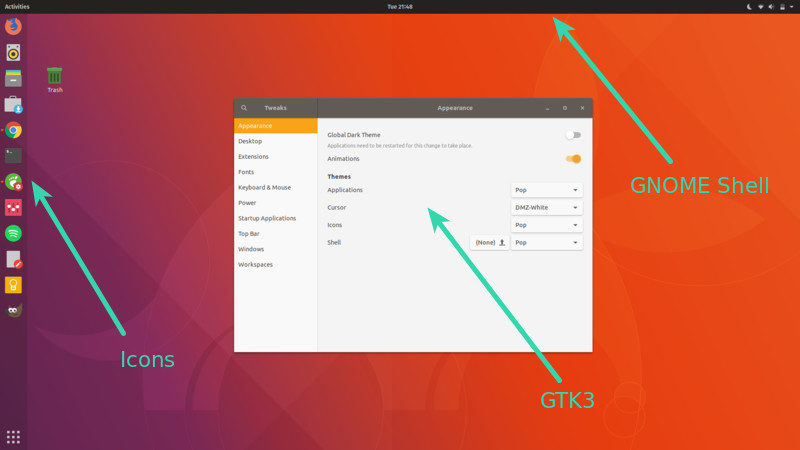 -(来自[How to Install and Change GNOME Theme in Linux](https://itsfoss.com/install-switch-themes-gnome-shell/)) +(来自[How to Install and Change GNOME Theme in Linux](https://itsfoss.com/install-switch-themes-gnome-shell/)) -在下载好主题后,您需要将压缩包解压到文件夹并置于以下任意一个文件夹中(按需求选择,用户安装指仅为本用户安装,系统安装则为所有用户安装): +在下载好主题后,您需要将压缩包解压到文件夹并置于以下任意一个文件夹中(按需求选择,用户安装指仅为本用户安装,系统安装则为所有用户安装): -- 用户安装: `~/.themes/` -- 系统安装: `/usr/share/themes/`(可能需要自行创建) +- 用户安装:`~/.themes/` +- 系统安装:`/usr/share/themes/`(可能需要自行创建) 您可以通过前文安装的`gnome-tweaks`启用主题,也可以按照对应主题下的启用指南来启用。 diff --git a/docs/desktop/de/kde.md b/docs/desktop/de/kde.md index fbfb593..454082f 100644 --- a/docs/desktop/de/kde.md +++ b/docs/desktop/de/kde.md @@ -27,7 +27,7 @@ Kvantum(包名为`kvantum`)是一个适用于KDE桌面环境的Qt主题引æ“ ### 扩展、主题等的安装 -大多数KDE的扩展、主题等的来源为 https://store.kde.org/ 与 https://www.pling.me/ ,而在中国大陆网络环境下,在KDE自带设置中安装的体验十分痛苦。 +大多数KDE的扩展、主题等的来源为 https://store.kde.org/ 与 https://www.pling.me/,而在中国大陆网络环境下,在KDE自带设置中安装的体验十分痛苦。 所以对于大多数扩展、主题等,需要通过手动方式进行安装。手动安装有两种方式: @@ -44,35 +44,35 @@ Kvantum(包名为`kvantum`)是一个适用于KDE桌面环境的Qt主题引æ“ ##### 用户安装 - - 全局主题 (Global Theme):`~/.local/share/plasma/look-and-feel/` - - Plasma 外观样式 (Plasma Style):`~/.local/share/plasma/desktoptheme/` - - 颜色 (Color Scheme):`~/.local/share/color-schemes/` - - 图标 (Icon Theme):`~/.local/share/icons/` - - 面板预设模板 (Panel Layout Template):`~/.local/share/plasma/layout-templates/` - - 任务切换器 (Task Switcher):`~/.local/share/kwin/tabbox/` - - 小部件 (Plasma Widget):`~/.local/share/plasma/plasmoids/` - - 壁纸插件 (Wallpaper Plugin):`~/.local/share/plasma/wallpapers/` - - 窗口装饰 (Window Decoration):`~/.local/share/aurorae/themes/` - - 桌面特效(KWin 效果)(KWin Effect):`~/.local/share/kwin/effects/` - - KWin 脚本 (KWin Script):`~/.local/share/kwin/scripts/` - - 登录屏幕 (SDDM) (Login Screen):无用户安装路径 - - 欢迎屏幕 (Splash Screen):`~/.local/share/plasma/look-and-feel/<主题名称>/contents/splash/` + - 全局主题(Global Theme):`~/.local/share/plasma/look-and-feel/` + - Plasma 外观样式(Plasma Style):`~/.local/share/plasma/desktoptheme/` + - 颜色(Color Scheme):`~/.local/share/color-schemes/` + - 图标(Icon Theme):`~/.local/share/icons/` + - 面板预设模板(Panel Layout Template):`~/.local/share/plasma/layout-templates/` + - 任务切换器(Task Switcher):`~/.local/share/kwin/tabbox/` + - 小部件(Plasma Widget):`~/.local/share/plasma/plasmoids/` + - 壁纸插件(Wallpaper Plugin):`~/.local/share/plasma/wallpapers/` + - 窗口装饰(Window Decoration):`~/.local/share/aurorae/themes/` + - 桌面特效(KWin 效果)(KWin Effect):`~/.local/share/kwin/effects/` + - KWin 脚本(KWin Script):`~/.local/share/kwin/scripts/` + - 登录屏幕(SDDM)(Login Screen):无用户安装路径 + - 欢迎屏幕(Splash Screen):`~/.local/share/plasma/look-and-feel/<主题名称>/contents/splash/` ##### 系统安装 - - 全局主题 (Global Theme):`/usr/share/plasma/look-and-feel/` - - Plasma 外观样式 (Plasma Style):`/usr/share/plasma/desktoptheme/` - - 颜色 (Color Scheme):`/usr/share/color-schemes/` - - 图标 (Icon Theme):`/usr/share/icons/` - - 面板预设模板 (Panel Layout Template):`/usr/share/plasma/layout-templates/` - - 任务切换器 (Task Switcher):`/usr/share/kwin/tabbox/` - - 小部件 (Plasma Widget):`/usr/share/plasma/plasmoids/` - - 壁纸插件 (Wallpaper Plugin):`/usr/share/plasma/wallpapers/` - - 窗口装饰 (Window Decoration):`/usr/share/aurorae/themes/` - - 桌面特效(KWin 效果)(KWin Effect):`/usr/share/kwin/effects/` - - KWin 脚本 (KWin Script):`/usr/share/kwin/scripts/ (` - - 登录屏幕 (SDDM) (Login Screen):`/usr/share/plasma/lookandfeel/<全局主题名称>/contents/splash/` - - 欢迎屏幕 (Splash Screen):`~/.local/share/plasma/look-and-feel/<全局主题名称>/contents/splash/` + - 全局主题(Global Theme):`/usr/share/plasma/look-and-feel/` + - Plasma 外观样式(Plasma Style):`/usr/share/plasma/desktoptheme/` + - 颜色(Color Scheme):`/usr/share/color-schemes/` + - 图标(Icon Theme):`/usr/share/icons/` + - 面板预设模板(Panel Layout Template):`/usr/share/plasma/layout-templates/` + - 任务切换器(Task Switcher):`/usr/share/kwin/tabbox/` + - 小部件(Plasma Widget):`/usr/share/plasma/plasmoids/` + - 壁纸插件(Wallpaper Plugin):`/usr/share/plasma/wallpapers/` + - 窗口装饰(Window Decoration):`/usr/share/aurorae/themes/` + - 桌面特效(KWin 效果)(KWin Effect):`/usr/share/kwin/effects/` + - KWin 脚本(KWin Script):`/usr/share/kwin/scripts/` + - 登录屏幕(SDDM)(Login Screen):`/usr/share/plasma/lookandfeel/<全局主题名称>/contents/splash/` + - 欢迎屏幕(Splash Screen):`~/.local/share/plasma/look-and-feel/<全局主题名称>/contents/splash/` (以上内容来自于[Plasma themes and plugins](https://develop.kde.org/docs/plasma/)) diff --git a/docs/desktop/de/xfce.md b/docs/desktop/de/xfce.md index 35bb745..d5d50a4 100644 --- a/docs/desktop/de/xfce.md +++ b/docs/desktop/de/xfce.md @@ -8,14 +8,14 @@ ## 概述 -Xfce是一个轻量级的[桌面环境](../desktop.md#_2),Xfce用着快速且轻便易于使用的优点,Xfce开机占有的内存大约只有700M,Xfce一开始使用X11显示协议,自从4.20版本开始提供了实验性的Wayland支持。 +Xfce是一个轻量级的[桌面环境](../desktop.md#_2),Xfce用着快速且轻便易于使用的优点,Xfce开机占有的内存大约只有700M,Xfce一开始使用X11显示协议,自从4.20版本开始提供了实验性的Wayland支持。 ## 安装 -- Debian系列: `sudo apt install xfce4` -- 红帽系: `sudo dnf install xfce4` -- Arch系: `sudo pacman -S xfce4` +- Debian系列:`sudo apt install xfce4` +- 红帽系:`sudo dnf install xfce4` +- Arch系:`sudo pacman -S xfce4` ## 配置 -您可以在开始菜单里打开设置管理器配置字体图标,您可以在桌面空白处右键选择桌面设置配置壁纸,Xfce的大多数设置都可以使用图形化的设置界面里完成修改。 +您可以在开始菜单里打开设置管理器配置字体图标,您可以在桌面空白处右键选择桌面设置配置壁纸,Xfce的大多数设置都可以使用图形化的设置界面里完成修改。 diff --git a/docs/desktop/desktop.md b/docs/desktop/desktop.md index 28e103a..1114f03 100644 --- a/docs/desktop/desktop.md +++ b/docs/desktop/desktop.md @@ -1,12 +1,12 @@ # 分类 -欢迎来到桌面页面,我们在这里整理了主流的桌面环境,窗口管理器,dotfiles,旨在帮助您选择最适合你的图形化环境。 +欢迎来到桌面页面,我们在这里整理了主流的桌面环境、窗口管理器、dotfiles,旨在帮助您选择最适合你的图形化环境。 当前主流Linux桌面配置可以分为以下两类。 ## 传统桌面 -桌面环境(有时称为桌面管理器)是对图形化桌面的实现。通常由多个软件组成。一个桌面环境中的软件共享同一个图形用户界面。在一个典型的桌面环境中,这些软件提供给计算机用户窗口,文件夹,工具栏,壁纸、图标以及像拖放等图形化服务。不同桌面环境在设计和功能上的特性和理念,会赋予其与众不同的外观和使用体验。 +桌面环境(有时称为桌面管理器)是对图形化桌面的实现。通常由多个软件组成。一个桌面环境中的软件共享同一个图形用户界面。在一个典型的桌面环境中,这些软件提供给计算机用户窗口、文件夹、工具栏、壁纸、图标以及像拖放等图形化服务。不同桌面环境在设计和功能上的特性和理念,会赋予其与众不同的外观和使用体验。 ???+ example "一些常见的DE" - KDE (K Desktop Environment): 贴近Windows操作逻辑,有高度的自定义性与丰富主题 @@ -28,13 +28,13 @@ 英文:Window Manager (WM) -窗口管理器是在图形用户界面中,控制窗口位置与外观的软件(管理窗口的放置、配色等等)。 许多窗口管理器是为了桌面环境编写,与桌面环境一同发布的,例如被GNOME使用的Mutter。同时也存在不少独立的窗口管理器,如Openbox、Awesome等。大部分窗口管理器是针对Linux、BSD等操作系统设计编写的,用户可以通过选择窗口管理器更改电脑的图形用户界面外观和使用方式。 +窗口管理器是在图形用户界面中,控制窗口位置与外观的软件(管理窗口的放置、配色等等)。许多窗口管理器是为了桌面环境编写,与桌面环境一同发布的,例如被GNOME使用的Mutter。同时也存在不少独立的窗口管理器,如Openbox、Awesome等。大部分窗口管理器是针对Linux、BSD等操作系统设计编写的,用户可以通过选择窗口管理器更改电脑的图形用户界面外观和使用方式。 传送门:[ArchWiki](https://wiki.archlinuxcn.org/wiki/%E7%AA%97%E5%8F%A3%E7%AE%A1%E7%90%86%E5%99%A8) ### 桌面外壳 -英文: Desktop Shell +英文:Desktop Shell 狭义来看,桌面外壳是指在**平铺窗口管理器**中,提供用户界面的应用套件(例如GNOME预装应用等)。 @@ -57,7 +57,7 @@ ### Dotfiles ???+info "特别注意" - 此处的dotfiles特指一种窗口管理器的配置集合,如end-4,dms等类似的配置集 + 此处的dotfiles特指一种窗口管理器的配置集合,如end-4、dms等类似的配置集 与DE(桌面环境)不同,WM(窗口管理器)通常不会给出一个默认的开箱即用配置,通常为了满足审美和操作便捷程度,就需要自定义WM的配置文件,然而,这并不是一个很小的工作量,甚至要求一定的bash和lua基础。而部分人本着贡献社区的理念,开源了他们调整好的WM配置文件,这就是dotfiles。dotfiles可以大大减少配置WM的工作量,并且获得一个相对不错的主题效果。 |