blob: 521a1ff83e9074f9839dc66f3542aeae8a345856 (
plain)
1
2
3
4
5
6
7
8
9
10
11
12
13
14
15
16
17
18
19
20
21
22
23
24
25
26
27
28
29
30
31
32
33
34
35
36
37
38
39
40
41
42
43
44
45
46
47
48
49
|
# i3

[官方文档(英文)](https://i3wm.org/docs/)
配置文件:默认`/etc/i3`,可复制`/etc/i3/config`到`~/.i3/`或`~/.config/i3/`
## 概述
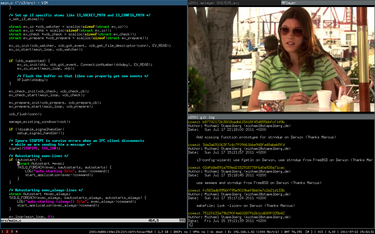
i3是一个平铺窗口管理器,采用BSD许可证发布,采用X11显示协议,主要面向Linux高级用户和开发者,简单高效。
## 安装
- Debian系: `sudo apt install i3-wm`
- 红帽系:`sudo dnf install i3-wm`
- Arch系: `sudo pacman -S i3-wm`
## 使用(默认快捷键)
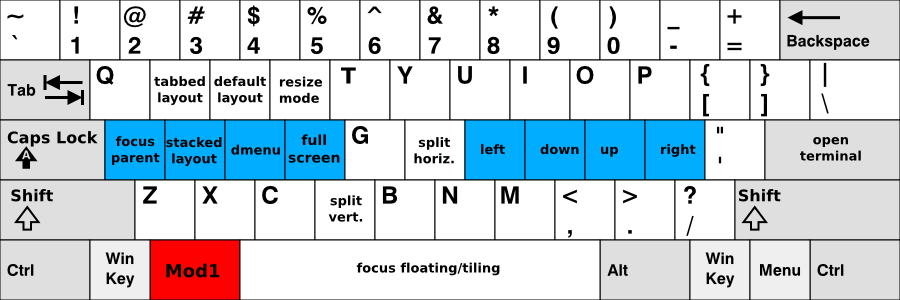
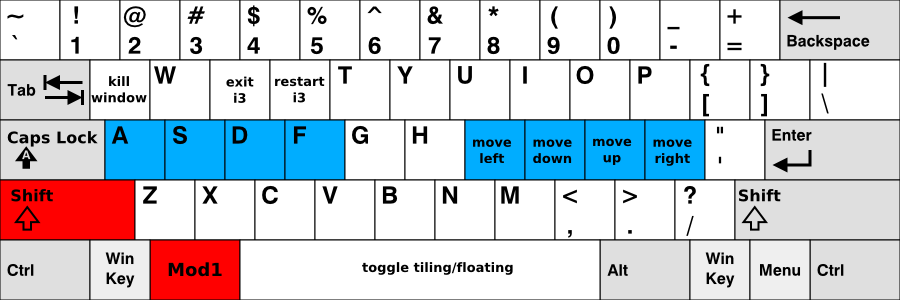
**mod键默认为alt键**
- mod+Enter 打开终端
- mod+j/k/l/; 选择聚焦的窗口
- mod+f 全屏窗口
- mod+Shift+q 关闭窗口
- mod+Shift+e 退出i3
- mod+Shift+Space 漂浮窗口
## 配置
**配置文件默认在/etc/i3,可复制/etc/i3/config到~/.i3/或~/.config/i3/**
因为i3官方文档写的较好,所以建议您阅读[官方文档](https://i3wm.org/docs/)。
## i3下的常用软件
- [Rofi](https://github.com/davatorium/rofi)
- [qutebrowser](https://qutebrowser.org/)
- [Yazi](https://github.com/sxyazi/yazi)
- [Music Player Daemon (MPD)](https://www.musicpd.org/)
- [mpc](https://www.musicpd.org/clients/mpc/)
- [i3bar](https://i3wm.org/docs/i3bar-protocol.html)
|
