
diff options
| author | FangcatChina <f20091219@outlook.com> | 2026-07-30 09:43:37 +0000 |
|---|---|---|
| committer | FangcatChina <f20091219@outlook.com> | 2026-07-30 09:43:37 +0000 |
| commit | 47299f66c409c5126c7e0510c18f9f15a3bb2fb5 (patch) | |
| tree | 3c847cebe90edaa82dfcebcb8c53d8152a41a78c /docs | |
| parent | Merge #14 (diff) | |
Zsh
Diffstat (limited to 'docs')
| -rw-r--r-- | docs/applications/zsh.md | 74 | ||||
| -rw-r--r-- | docs/concepts/linux/shell.md | 17 | ||||
| -rw-r--r-- | docs/desktop/wm/hyprland.md | 9 | ||||
| -rw-r--r-- | docs/desktop/wm/niri.md | 9 | ||||
| -rw-r--r-- | docs/getting-started/common-command.md | 4 | ||||
| -rw-r--r-- | docs/getting-started/post-installation.md | 2 | ||||
| -rw-r--r-- | docs/img/hyprland.svg | 64 |

7 files changed, 169 insertions, 10 deletions
diff --git a/docs/applications/zsh.md b/docs/applications/zsh.md new file mode 100644 index 0000000..f99c5c1 --- /dev/null +++ b/docs/applications/zsh.md @@ -0,0 +1,74 @@ +# Zsh + +Zsh是一款拥有高度自定义性的[Shell](../concepts/linux/shell.md),它具有强大的自动补全、语法高亮,并且由于Oh My Zsh的支持,拥有海量主题与插件,特别适合用于美化。 + +## 安装 + +### Zsh + +以下命令用于安装Zsh与部分推荐扩展。 + +- Debian: `sudo apt install zsh zsh-autosuggestions zsh-syntax-highlighting` +- Fedora: `sudo dnf install zsh zsh-autosuggestions zsh-syntax-highlighting` +- Arch: `sudo pacman -S zsh zsh-completions zsh-autosuggestions zsh-syntax-highlighting` + +安装好后,您可以运行`chsh -s /bin/zsh`来设置Zsh为默认终端。 + +部分发行版源的`zsh`包,在初次运行`zsh`时,会询问您想要如何配置`.zshrc`(Zsh的配置文件)。我们建议您输入2来选择`(2) Populate your ~/.zshrc with the configuration recommended by the system administrator and exit (you will need to edit the file by hand, if so desired).`(默认推荐配置)。 + +### Oh My Zsh + +[Oh My Zsh](https://ohmyz.sh/)能够用于管理`.zshrc`配置文件,简化Zsh的配置过程,并通过丰富的插件和主题生态,极大地提升终端的使用效率和视觉体验。 + +在安装之前,您首先需要使用包管理器安装Git(包名`git`)。 + +#### 一键安装 + +运行以下一键安装脚本即可。 + +```bash +sh -c "$(curl -fsSL https://raw.githubusercontent.com/ohmyzsh/ohmyzsh/master/tools/install.sh)" +# 或者 +sh -c "$(wget https://raw.githubusercontent.com/ohmyzsh/ohmyzsh/master/tools/install.sh -O -)" +``` +!!! warning "网络问题" + 该脚本与 https://install.ohmyz.sh 的脚本本质相同,均需要从Github克隆Zsh仓库,因此可能需要较好的网络环境。 + +#### 手动安装 + +若您因为网络原因无法使用一键安装,您可以采用手动安装。 + +```bash +# 克隆仓库(使用gh-proxy以规避网络问题) +git clone https://gh-proxy.com/https://github.com/ohmyzsh/ohmyzsh ~/.oh-my-zsh +# 或者使用Gitee(需要登录) +# git clone https://gitee.com/mirrors/ohmyzsh ~/.oh-my-zsh +# 备份.zshrc +mv ~/.zshrc ~/.zshrc.orig +# 使用Oh My Zsh提供的模板 +cp ~/.oh-my-zsh/templates/zshrc.zsh-template ~/.zshrc +# 应用Oh My Zsh +zsh +``` + +## 主题 + +大部分Zsh主题可以在[Github](https://github.com/topics/zsh-theme)上找到,同时,Oh My Zsh也拥有大量的[预置主题](https://github.com/ohmyzsh/ohmyzsh/wiki/Themes)。大部分主题均提供了安装脚本,此处我们以[Powerlevel10k](https://github.com/romkatv/powerlevel10k)为例。 + +??? note "字体" + Powerlevel10k需要安装以下字体(链接已加速)来确保呈现效果: + + - [MesloLGS NF Regular.ttf](https://gh-proxy.com/https://github.com/romkatv/powerlevel10k-media/raw/master/MesloLGS%20NF%20Regular.ttf) + - [MesloLGS NF Bold.ttf](https://gh-proxy.com/https://github.com/romkatv/powerlevel10k-media/raw/master/MesloLGS%20NF%20Bold.ttf) + - [MesloLGS NF Italic.ttf](https://gh-proxy.com/https://github.com/romkatv/powerlevel10k-media/raw/master/MesloLGS%20NF%20Italic.ttf) + - [MesloLGS NF Bold Italic.ttf](https://gh-proxy.com/https://github.com/romkatv/powerlevel10k-media/raw/master/MesloLGS%20NF%20Bold%20Italic.ttf) + + 下载字体后,双击通过桌面环境自带的字体应用安装即可。同时,您可能需要[配置对应终端的字体(Github)](https://github.com/romkatv/powerlevel10k#meslo-nerd-font-patched-for-powerlevel10k)。 + + +```bash +# 克隆仓库 +git clone --depth=1 https://gitee.com/romkatv/powerlevel10k.git ~/powerlevel10k +# 写入.zshrc +echo 'source ~/powerlevel10k/powerlevel10k.zsh-theme' >>~/.zshrc +``` diff --git a/docs/concepts/linux/shell.md b/docs/concepts/linux/shell.md new file mode 100644 index 0000000..9eeb82c --- /dev/null +++ b/docs/concepts/linux/shell.md @@ -0,0 +1,17 @@ +# Shell + +中文: 外壳 + +## 概述 + +Shell是用户与Linux内核直接对话的“窗口”,你可以将它理解为Windows的CMD(命令提示符)。用户通过在Shell输入指令达到操作系统的目的。 + +大多数Shell的配置文件包括环境变量、主题等内容,且位于用户目录下,为以`.`开头的隐藏文件,如`.bashrc`(Bash)、`.zshrc`(Zsh)。 + +!!! warning "消歧义" + 终端是Shell的图形化呈现。尽管有Ptyxis、Konsole等等终端,但其所调用、运行的依然是诸如Bash等等的Shell。 + +??? note "常见的Linux Shell" + - Bash: 大多数Linux发行版预装的Shell,兼容性强,支持广 + - Zsh: 自定义性强,有强大的自动补全功能,并兼容Bash语法 + - Fish: 用户友好,人性化设计,易配置
\ No newline at end of file diff --git a/docs/desktop/wm/hyprland.md b/docs/desktop/wm/hyprland.md index 69ae4dd..f879e24 100644 --- a/docs/desktop/wm/hyprland.md +++ b/docs/desktop/wm/hyprland.md @@ -1,15 +1,18 @@ # Hyprland -[官方Wiki(英文)](https://wiki.hypr.land/) + -配置文件: `~/.config/hypr/hyprland.conf` -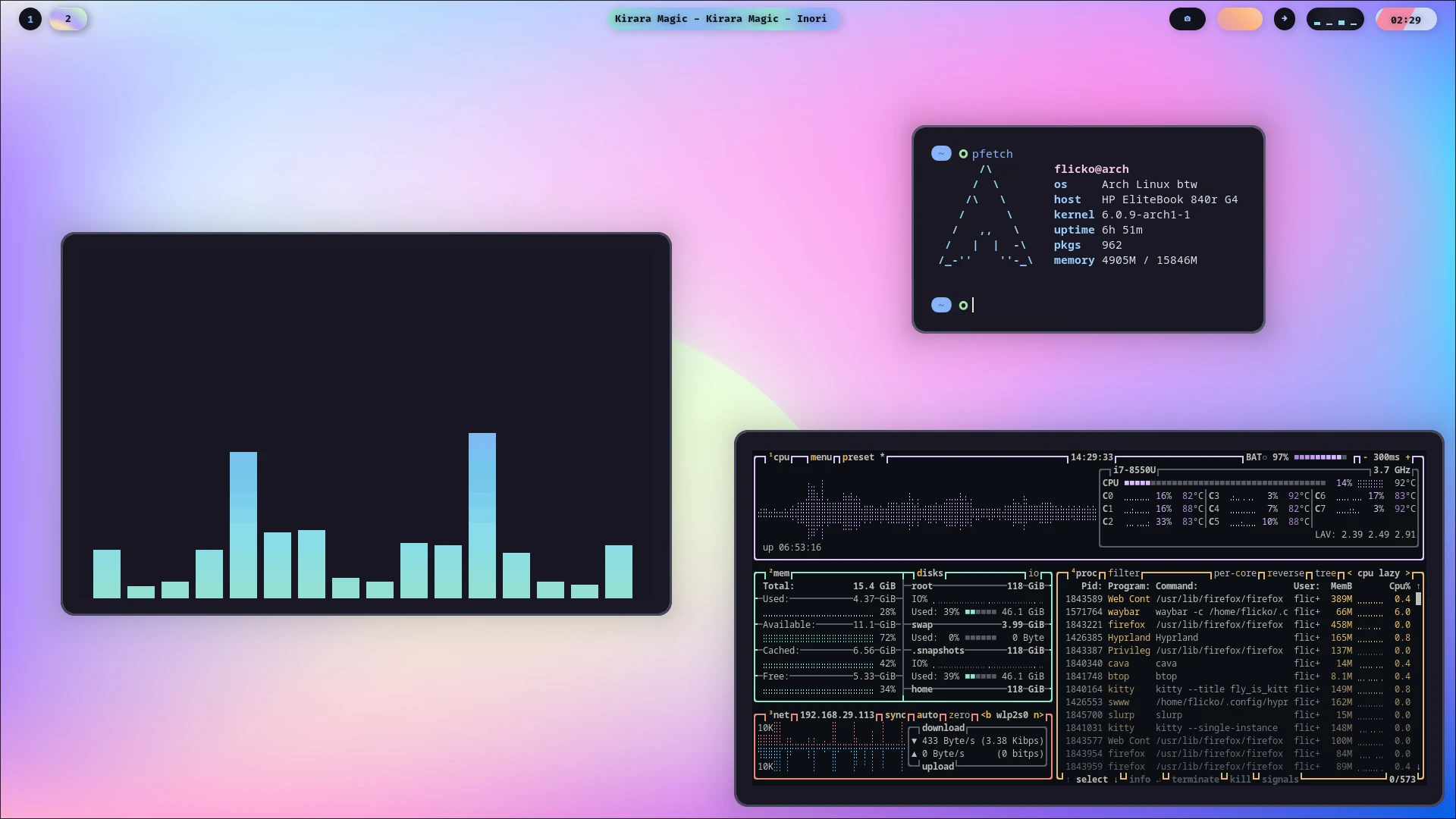 +[官方Wiki(英文)](https://wiki.hypr.land/) + +配置文件: `~/.config/hypr/hyprland.lua` ## 概述 Hyprland 是一款在 Linux 社区,尤其是喜欢定制桌面环境的用户中非常热门的**动态平铺 Wayland 合成器**。它之所以特别,是因为它试图在强大的功能、炫酷的视觉效果和高度可定制性之间找到一个很好的平衡点。 + + ## 特性 Hyprland拥有相对惊艳的视觉效果,并支持动态平铺窗口,能够自动排列并充分利用屏幕空间。它支持多种平铺布局,如 dwindle(二分平铺)和 master(主从布局),并且可以为不同的工作区设置独立的布局,并通过自定义渲染器,能提供流畅的窗口动画、圆角等效果。 diff --git a/docs/desktop/wm/niri.md b/docs/desktop/wm/niri.md index 651adb0..a040fd6 100644 --- a/docs/desktop/wm/niri.md +++ b/docs/desktop/wm/niri.md @@ -1,17 +1,18 @@ # Niri -[官方Wiki(英文,Github)](https://github.com/niri-wm/niri/wiki/) + -[翻译版Wiki](https://docs.akass.cn/niri/) +[官方Wiki(英文,Github)](https://github.com/niri-wm/niri/wiki/) [翻译版Wiki](https://docs.akass.cn/niri/) 配置文件: `~/.config/niri/config.kdl` - - ## 概述 Niri是一个以滚动平铺为核心理念的Wayland合成器。它用Rust编写,将窗口在无限水平长条上按列布局,打开新窗口不会改变现有窗口大小,旨在提供流畅、有组织的工作体验,目前可稳定用于日常使用。 + + + ## 安装 在安装之前,我们建议您首先选择好适合的[桌面外壳](../../concepts/desktop/desktop_shell.md)。 diff --git a/docs/getting-started/common-command.md b/docs/getting-started/common-command.md index 24fc684..87f2c97 100644 --- a/docs/getting-started/common-command.md +++ b/docs/getting-started/common-command.md @@ -8,7 +8,7 @@ ## 常见符号 -- `$`: 用以表示终端环境,不需要进行输入。 +- `$`: 用以表示[Shell](../concepts/linux/shell.md)环境,不需要进行输入。 - `#`: 用以表示注释,井号后的内容会被自动忽略。 - `~`: 用以代表用户目录,如 `~/file` 。 - `*`: 通配符,可代指“全部”,如 `dir1/*` 指 `dir1` 下全部文件、文件夹,`dir1/file*.file`指 `dir1` 文件夹下所有以 `file` 开头,`.file` 结尾的文件与文件夹。 @@ -36,7 +36,7 @@ ### cd -将Shell的工作目录切换到某目录。 +将[Shell](../concepts/linux/shell.md)的工作目录切换到某目录。 默认情况下,Shell的工作目录为 `/home` 下的对应用户文件夹,并会在左侧展示(部分Shell可能除外)。 diff --git a/docs/getting-started/post-installation.md b/docs/getting-started/post-installation.md index 8005b81..da3fdd0 100644 --- a/docs/getting-started/post-installation.md +++ b/docs/getting-started/post-installation.md @@ -23,7 +23,7 @@ [Flatpak](../concepts/package_managers/flatpak.md)是新一代Linux软件管理工具。其采用沙箱式设计,使得软件能够兼容多数发行版。并且,基于Flatpak的Flathub是Linux上极其重要的应用商店,深度集成于KDE Discover, GNOME。 -**对于用户软件,我们推荐您使用Flatpak或[AppImage](../concepts/package_managers/appimage.md)进行安装。** +**对于用户软件,我们推荐您使用[Flatpak](../concepts/package_managers/flatpak.md)或[AppImage](../concepts/package_managers/appimage.md)进行安装。** 您可以通过包管理器或者桌面环境自带的应用商店安装Flatpak。同样的,Flathub也需要换源。 diff --git a/docs/img/hyprland.svg b/docs/img/hyprland.svg new file mode 100644 index 0000000..a2b3255 --- /dev/null +++ b/docs/img/hyprland.svg @@ -0,0 +1,64 @@ +<svg viewBox="0 330 1006.49 347.4685344827586" version="1.1" xmlns:xlink="http://www.w3.org/1999/xlink" xmlns="http://www.w3.org/2000/svg" width="1006.49" height="347.4685344827586"> + <defs> + <style> + .st0 { + fill: url(#a); + } + + .st1 { + fill: url(#b); + } + + .st2 { + fill: url(#c); + } + + .st3 { + fill: url(#d); + } + + .st4 { + fill: url(#e); + } + + .st5 { + fill: url(#f); + } + + .st6 { + fill: url(#g); + } + + .st7 { + fill: url(#h); + } + + .st8 { + fill: url(#i); + } + </style><style class="darkreader darkreader--sync" media="screen"/> + <linearGradient gradientUnits="userSpaceOnUse" y2="491.29" x2="561.93" y1="593.85" x1="561.93" id="i"> + <stop stop-color="#00a8f4" offset="0" style="--darkreader-inline-stopcolor: var(--darkreader-background-00a8f4, #0086c3);" data-darkreader-inline-stopcolor=""/> + <stop stop-color="#00e5d0" offset="1" style="--darkreader-inline-stopcolor: var(--darkreader-background-00e5d0, #00b7a6);" data-darkreader-inline-stopcolor=""/> + </linearGradient> + <linearGradient xlink:href="#i" y2="491.58" x2="630.69" y1="567.48" x1="630.69" id="c"/> + <linearGradient xlink:href="#i" y2="493.77" x2="480.34" y1="596.04" x1="480.34" id="a"/> + <linearGradient xlink:href="#i" y2="470.31" x2="392.86" y1="567.48" x1="392.86" id="b"/> + <linearGradient xlink:href="#i" y2="491.73" x2="804.79" y1="567.48" x1="804.79" id="f"/> + <linearGradient xlink:href="#i" y2="463.46" x2="883.97" y1="569.67" x1="883.97" id="g"/> + <linearGradient xlink:href="#i" y2="465.94" x2="671.56" y1="567.48" x1="671.56" id="d"/> + <linearGradient xlink:href="#i" y2="491.58" x2="724.23" y1="569.67" x1="724.23" id="e"/> + <linearGradient xlink:href="#i" y2="346.78" x2="202.09" y1="659.7" x1="202.09" id="h"/> + </defs> + <g> + <path d="M580.29,495c-5.59-2.48-12.07-3.71-19.45-3.71-4.86,0-9.4.36-13.62,1.09-4.22.73-7.94,1.82-11.15,3.28-3.2,1.46-5.73,3.3-7.58,5.54-1.85,2.24-2.77,4.95-2.77,8.16v84.5h21.27v-28.09c1.05.58,2.16,1.1,3.35,1.5,3.01,1.02,5.92,1.67,8.74,1.97,2.82.29,4.95.44,6.41.44,6.9,0,12.75-1.6,17.56-4.81,4.81-3.21,8.52-7.7,11.15-13.48,2.62-5.78,3.93-12.46,3.93-20.03,0-10.1-1.58-18.07-4.73-23.89-3.16-5.83-7.53-9.98-13.11-12.46ZM574.46,543.37c-1.31,3.16-3.23,5.42-5.75,6.77-2.53,1.36-5.73,2.04-9.62,2.04-1.75,0-3.74-.24-5.97-.73-2.24-.48-4.28-1.26-6.12-2.33v-34.67c0-1.46.99-2.64,2.99-3.57,1.99-.92,5.32-1.38,9.98-1.38,4.27,0,7.6.85,9.98,2.55,2.38,1.7,4.05,4.1,5.03,7.21.97,3.11,1.46,6.9,1.46,11.36,0,5.34-.66,9.59-1.97,12.75Z" class="st8"/> + <path d="M638.78,491.58c-4.57,0-9.11.61-13.62,1.82-4.52,1.22-8.52,2.57-12.02,4.08-3.5,1.51-5.93,2.84-7.28,4.01v66h21.71v-56.96c1.65-.29,3.69-.48,6.12-.58,2.43-.1,5-.12,7.72-.07,2.72.05,5.34.17,7.87.36,2.52.2,4.61.49,6.26.87v-15.88c-1.36-1.07-3.35-1.94-5.97-2.62-2.62-.68-6.22-1.02-10.78-1.02Z" class="st2"/> + <path d="M481.21,542.1l-15.66-48.33h-24.91l29.61,72.88c-.37,1.26-.77,2.39-1.21,3.39-1.17,2.67-2.65,4.56-4.44,5.68-1.8,1.12-3.91,1.68-6.34,1.68-1.46,0-2.87-.12-4.22-.36-1.36-.24-2.82-.66-4.37-1.24v17.63c1.65.78,3.64,1.41,5.97,1.89,2.33.48,4.71.73,7.14.73,3.5,0,6.9-.87,10.2-2.62,3.3-1.75,6.48-4.61,9.54-8.6,3.06-3.98,5.9-9.37,8.52-16.17l28.99-74.89h-23.31l-15.52,48.33Z" class="st0"/> + <polygon points="410.78 509.65 375.08 509.65 375.08 470.31 351.48 470.31 351.48 567.48 375.08 567.48 375.08 528.88 410.78 528.88 410.78 567.48 434.23 567.48 434.23 470.31 410.78 470.31 410.78 509.65" class="st1"/> + <path d="M825.12,494.28c-4.66-1.7-10.3-2.55-16.9-2.55-3.11,0-6.48.24-10.13.73-3.64.49-7.26,1.12-10.85,1.89-3.59.78-6.9,1.68-9.91,2.7-3.01,1.02-5.44,2.02-7.28,2.99v67.45h21.71v-55.36c1.17-.58,2.86-1.14,5.1-1.67,2.23-.53,4.47-.8,6.7-.8,2.62,0,4.86.32,6.7.95,1.84.63,3.3,1.51,4.37,2.62,1.07,1.12,1.87,2.45,2.4,4.01.53,1.56.8,3.26.8,5.1v45.16h21.71v-49.54c0-6.51-1.24-11.65-3.71-15.44-2.48-3.79-6.05-6.53-10.71-8.23Z" class="st5"/> + <path d="M899.27,463.46v31.53c-.93-.55-1.9-1.01-2.91-1.37-2.72-.97-5.34-1.58-7.87-1.82-2.53-.24-4.57-.36-6.12-.36-11.75,0-20.57,3.45-26.44,10.34-5.88,6.9-8.81,16.32-8.81,28.26,0,7.67.99,14.08,2.99,19.23,1.99,5.15,4.73,9.2,8.23,12.17,3.5,2.96,7.65,5.08,12.46,6.34,4.81,1.26,10.08,1.89,15.81,1.89,4.27,0,8.45-.46,12.53-1.38,4.08-.92,7.74-2.26,11-4.01,3.25-1.75,5.85-3.96,7.79-6.63,1.94-2.67,2.91-5.8,2.91-9.4v-84.79h-21.56ZM899.27,545.92c0,1.85-1.09,3.23-3.28,4.15-2.19.92-5.03,1.38-8.52,1.38-4.57,0-8.18-.85-10.85-2.55-2.67-1.7-4.59-4.08-5.75-7.14-1.17-3.06-1.75-6.72-1.75-11,0-5.44.7-9.76,2.11-12.97,1.41-3.2,3.52-5.49,6.34-6.85,2.82-1.36,6.26-2.04,10.34-2.04,1.84,0,3.76.27,5.75.8,1.99.54,3.86,1.29,5.61,2.26v33.95Z" class="st6"/> + <rect height="101.55" width="21.56" y="465.94" x="660.78" class="st3"/> + <path d="M750.3,498.72c-2.38-1.94-4.98-3.42-7.79-4.44-2.82-1.02-5.63-1.72-8.45-2.11-2.82-.39-5.39-.58-7.72-.58-6.61,0-12.55.68-17.85,2.04-5.3,1.36-9.2,2.82-11.73,4.37v19.23c2.72-2.14,6.24-3.96,10.56-5.46,4.32-1.5,8.62-2.26,12.89-2.26,5.24,0,9.3,1,12.17,2.99,2.86,1.99,4.3,5.22,4.3,9.69v4.68c-.7-.4-1.44-.8-2.26-1.19-2.48-1.17-5.27-2.09-8.38-2.77-3.11-.68-6.32-1.02-9.62-1.02-5.93,0-10.83.92-14.71,2.77-3.89,1.85-6.77,4.47-8.67,7.87-1.89,3.4-2.84,7.38-2.84,11.95,0,4.86.82,8.91,2.48,12.16,1.65,3.26,3.96,5.83,6.92,7.72,2.96,1.89,6.41,3.25,10.34,4.08,3.93.82,8.13,1.24,12.6,1.24,7.48,0,13.86-.58,19.16-1.75,5.29-1.17,9.35-3.03,12.16-5.61,2.82-2.57,4.23-5.95,4.23-10.13l.15-34.82c0-4.47-.73-8.21-2.19-11.22-1.46-3.01-3.38-5.49-5.75-7.43ZM733.7,553.35c-1.99.68-5.46,1.02-10.42,1.02-1.94,0-3.81-.39-5.61-1.17-1.8-.78-3.23-1.89-4.3-3.35-1.07-1.46-1.6-3.11-1.6-4.95,0-3.01,1.09-5.22,3.28-6.63,2.19-1.41,5.66-2.11,10.42-2.11,3.11,0,6.02.34,8.74,1.02.87.22,1.69.47,2.48.74v11.36c0,2.04-1,3.4-2.99,4.08Z" class="st4"/> + </g> + <path d="M311.03,491.55c-9.09-20.56-22.42-39.71-35.29-58.22-2.38-3.41-4.62-6.64-6.84-9.87-3.15-4.6-7.42-10.49-12.36-17.31-11.29-15.59-28.92-39.62-40.84-59.36v49.42c12.28,17.62,24.2,33.49,30.57,42.78,13.94,20.33,30.09,42,39.67,63.66,28.78,65.13-11.7,128.85-82.05,129.61h-1.26c-.18,0-.35,0-.53,0-.18,0-.35,0-.53,0h-1.26c-70.35-.76-110.84-64.48-82.05-129.61,9.58-21.67,25.72-43.33,39.67-63.66,6.36-9.28,18.28-25.16,30.57-42.78v-49.42c-11.92,19.75-29.55,43.78-40.84,59.36-4.94,6.81-9.21,12.7-12.36,17.31-2.22,3.23-4.46,6.45-6.84,9.87-12.88,18.52-26.21,37.67-35.29,58.22-8.83,19.97-12.7,40.38-11.49,60.65,1.16,19.65,7.28,38.57,17.68,54.73,10.28,15.97,24.74,29.21,41.81,38.29,17.64,9.37,37.44,14.25,58.87,14.48.52,0,1.03,0,1.56,0,.18,0,.35,0,.53,0,.18,0,.35,0,.53,0,.52,0,1.03,0,1.56,0,21.43-.23,41.23-5.1,58.87-14.48,17.07-9.08,31.52-22.32,41.81-38.29,10.4-16.16,16.52-35.08,17.68-54.73,1.2-20.27-2.67-40.68-11.49-60.65Z" class="st7"/> +</svg>
\ No newline at end of file |
