
diff options
Diffstat (limited to 'docs')


33 files changed, 427 insertions, 46 deletions
diff --git a/docs/assets/css/tippy.css b/docs/assets/css/tippy.css new file mode 100644 index 0000000..0b5d095 --- /dev/null +++ b/docs/assets/css/tippy.css @@ -0,0 +1,22 @@ +.tippy { + overflow: hidden !important; + height: 5%; + border-radius: 5px; +} + +[data-md-color-scheme="default"] .tippy{ + border: 1px solid whitesmoke; +} + +[data-md-color-scheme="slate"] .tippy{ + border: 1px solid var(--md-default-fg-color--lightest); +} + +[data-theme~='translucent'] { + background-color: var(--md-default-bg-color) !important; + opacity: 0.9 !important; +} + +[data-md-color-scheme="default"] .tippy-box * { + color: black; +} diff --git a/docs/assets/js/wiki_hover.js b/docs/assets/js/wiki_hover.js new file mode 100644 index 0000000..0ba1205 --- /dev/null +++ b/docs/assets/js/wiki_hover.js @@ -0,0 +1,246 @@ +/** + * @file Wiki Hover + * @description Hover over a link to see the content of the link + * Doesn't work on mobile and header + * @see tippy https://atomiks.github.io/tippyjs/ + */ + +const blogURL = document.querySelector('meta[name="site_url"]') + ? document.querySelector('meta[name="site_url"]').content + : location.origin; + +/** + * @description Replace broken image with encoded image in first para + * @param {Element} firstPara + * @returns {Element} firstPara + */ +function brokenImage(firstPara) { + const brokenImage = firstPara?.querySelectorAll("img"); + if (brokenImage) { + for (let i = 0; i < brokenImage.length; i++) { + const encodedImage = brokenImage[i]; + encodedImage.src = decodeURI(decodeURI(encodedImage.src)); + encodedImage.src = encodedImage.src.replace( + location.origin, + blogURL + ); + } + } + return firstPara +} + +/** + * Strip text of first para of unwanted characters + * @param {Element} firstPara + * @returns {Element} firstPara + */ +function cleanText(firstPara) { + firstPara.innerText = firstPara.innerText + .replaceAll("↩", "") + .replaceAll("¶", ""); + return firstPara +} + +function calculateHeight(firstPara) { + const paragraph = firstPara ? firstPara.innerText ? firstPara.innerText : firstPara : ""; + const height = Math.floor( + paragraph.split(" ").length / 100 + ); + if (height < 2) { + return `auto`; + } else if (height >= 5) { + return `20rem`; + } + return `${height}rem`; +} + +/** + * 筛选正文内的有效内部链接 + 脚注链接 + * @returns {Element[]} 符合条件的链接元素数组 + */ +function getInternalLinks() { + const contentLinks = document.querySelectorAll('.md-content a'); + const footnoteLinks = document.querySelectorAll('a.footnote-ref'); + const allLinks = [...contentLinks, ...footnoteLinks]; + + return Array.from(allLinks).filter(link => { + const href = link.getAttribute('href'); + if (!href) return false; + + // 排除功能性按钮(复制按钮、标题锚点图标等) + if (link.closest('.md-content__button')) return false; + // 排除纯锚点跳转 + if (href.startsWith('#')) return false; + // 排除外部链接 + if (/^https?:\/\//.test(href) && !href.startsWith(location.origin)) return false; + + return true; + }); +} + +function initWikiHover() { + try { + // 销毁旧实例,避免重复绑定 + if (window.tippy && tippy.instances) { + tippy.instances.forEach(instance => instance.destroy()); + } + + const targetLinks = getInternalLinks(); + if (targetLinks.length === 0) return; + + tippy(targetLinks, { + content: "", + allowHTML: true, + animation: "scale-subtle", + theme: "translucent", + followCursor: true, + arrow: false, + touch: "hold", + inlinePositioning: true, + placement: 'top', + // Popper 自动翻转与边界避让 + popperOptions: { + modifiers: [ + { + name: 'flip', + options: { + fallbackPlacements: ['bottom', 'right', 'left'], + padding: 12 + } + }, + { + name: 'preventOverflow', + options: { + padding: 12, + boundary: 'viewport' + } + } + ] + }, + onShow(instance) { + fetch(instance.reference.href) + .then((response) => response.text()) + .then((html) => { + const parser = new DOMParser(); + return parser.parseFromString(html, "text/html"); + }) + .then((doc) => { + // 按标题拆分内容区块 + const headers = doc.querySelectorAll("h1, h2, h3, h4, h5, h6"); + headers.forEach(function (header) { + const headerName = header.id || header.innerText.split("\n")[0].toLowerCase().replaceAll(" ", "-"); + if (headerName.length > 0) { + const div = doc.createElement("div"); + div.classList.add(headerName); + let nextElement = header.nextElementSibling; + while (nextElement && !nextElement.matches("h1, h2, h3, h4, h5, h6")) { + div.appendChild(nextElement); + nextElement = nextElement.nextElementSibling; + } + header.parentNode.insertBefore(div, header.nextSibling); + } + }); + return doc; + }) + .then((doc) => { + // 当前页面链接不显示预览 + if (location.href.replace(location.hash, "") === instance.reference.href) { + instance.hide(); + instance.destroy(); + return; + } + + let firstPara = doc.querySelector("article"); + const firstHeader = doc.querySelector("h1"); + + // Index 页面显示真实文件名 + if (firstHeader && firstHeader.innerText === "Index") { + const realFileName = decodeURI( + doc.querySelector('link[rel="canonical"]').href + ) + .split("/") + .filter((e) => e) + .pop(); + firstHeader.innerText = realFileName; + } + + firstPara = brokenImage(firstPara); + + const element1 = document.querySelector(`[id^="tippy"]`); + if (element1) { + element1.classList.add("tippy"); + } + + const partOfText = instance.reference.href.replace(/.*#/, "#"); + let toDisplay = firstPara; + let displayType; + + if (partOfText.startsWith("#")) { + firstPara = doc.querySelector( + `[id="${partOfText.replace("#", "")}"]` + ); + if (firstPara.tagName.includes("H")) { + const articleDOM = doc.createElement("article"); + articleDOM.classList.add("md-content__inner", "md-typeset"); + articleDOM.appendChild(doc.querySelector(`div.${partOfText.replace("#", "")}`)); + toDisplay = articleDOM; + firstPara = toDisplay; + } else if (firstPara.innerText.replace(partOfText).length === 0) { + firstPara = doc.querySelector("div.citation"); + toDisplay = firstPara; + } else { + toDisplay = cleanText(firstPara).innerText; + } + instance.popper.style.height = "auto"; + } else { + instance.popper.style.height = calculateHeight(firstPara); + } + + // 根据内容长度动态调整首选方向 + const textLength = firstPara?.innerText?.length || 0; + if (textLength > 500) { + instance.setProps({ placement: 'right' }); + } else { + instance.setProps({ placement: 'top' }); + } + + if (firstPara.innerText.length > 0) { + if (!displayType) { + instance.setContent(toDisplay) + instance.popper.style.height = calculateHeight(toDisplay); + } + } else { + firstPara = doc.querySelector("article"); + instance.reference.href.replace(/.*#/, "#"); + instance.popper.style.height = calculateHeight(firstPara); + } + + // 内容渲染完成后强制重新计算位置 + requestAnimationFrame(() => { + instance.popperInstance?.update(); + }); + }) + .catch((error) => { + console.log(error); + instance.hide(); + instance.destroy(); + }); + }, + }); + } catch { + console.log("tippy error, ignore it"); + } +} + +// 适配加载时机 +if (typeof document$ !== 'undefined') { + // Material 主题 instant 即时导航模式 + document$.subscribe(initWikiHover); +} else { + // 普通页面加载 + if (document.readyState === 'loading') { + document.addEventListener('DOMContentLoaded', initWikiHover); + } else { + initWikiHover(); + } +} diff --git a/docs/concepts/linux/de.md b/docs/concepts/desktop/de.md index 25490a4..25490a4 100644 --- a/docs/concepts/linux/de.md +++ b/docs/concepts/desktop/de.md diff --git a/docs/concepts/desktop/desktop_shell.md b/docs/concepts/desktop/desktop_shell.md new file mode 100644 index 0000000..b9177f5 --- /dev/null +++ b/docs/concepts/desktop/desktop_shell.md @@ -0,0 +1,23 @@ +# 桌面外壳 + +英文: Desktop Shell + +## 解释 + +狭义来看,桌面外壳是指在**平铺窗口管理器**中,提供用户界面的应用套件。 + +???+ note "常见的桌面外壳" + - DMS (Dank Material Shell): 目前最广为人知的桌面外壳,采用Material You设计理念,现代而优雅。 + 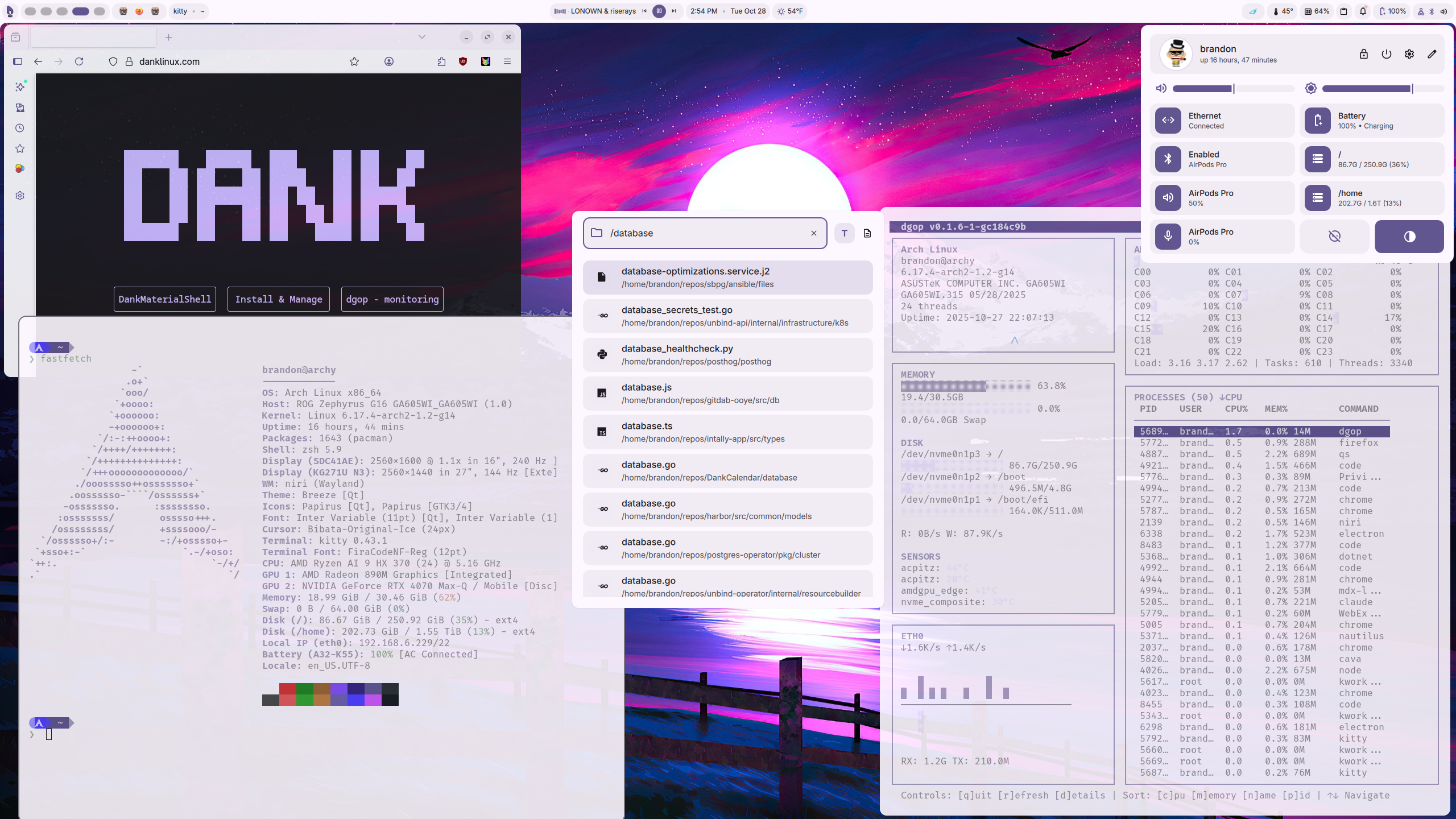 + ??? info "安装教程" + 我们建议您使用[DankInstall](https://danklinux.com/docs/dankinstall),既其一键脚本。该脚本不仅提供了桌面外壳的安装,还内置了Hyprland/Niri的安装功能,省心省力。 + + ```bash + sudo -v && curl -fsSL https://install.danklinux.com | sh -s -- \ + -c hyprland -t kitty --include-deps dms-greeter --replace-configs-all -y + ``` + + - Noctalia: 操作顺滑,可自定义性高。 +  + + ...
\ No newline at end of file diff --git a/docs/concepts/linux/dotfiles.md b/docs/concepts/desktop/dotfiles.md index ce4e2bb..ce4e2bb 100644 --- a/docs/concepts/linux/dotfiles.md +++ b/docs/concepts/desktop/dotfiles.md diff --git a/docs/concepts/desktop/tiling_desktop.md b/docs/concepts/desktop/tiling_desktop.md new file mode 100644 index 0000000..f6303db --- /dev/null +++ b/docs/concepts/desktop/tiling_desktop.md @@ -0,0 +1,11 @@ +# 平铺桌面 + +英文: Tiling Desktop + +## 解释 + +平铺桌面简单来说就是不允许窗口堆叠(如下图),只允许窗口铺展开摆放。 + + + + diff --git a/docs/concepts/linux/wm.md b/docs/concepts/desktop/wm.md index 72bf0eb..72bf0eb 100644 --- a/docs/concepts/linux/wm.md +++ b/docs/concepts/desktop/wm.md diff --git a/docs/concepts/linux/btrfs.md b/docs/concepts/file_system/btrfs.md index 9b20db3..3234ea2 100644 --- a/docs/concepts/linux/btrfs.md +++ b/docs/concepts/file_system/btrfs.md @@ -4,7 +4,12 @@ ## 概述 -Btrfs即B-tree文件系统,通常念成Butter FS,Better FS或B-tree FS,一种支持写入时复制(COW),以B-tree为核心数据结构的文件系统,运行在Linux操作系统。Btrfs有着众多的高级功能。以下为btrfs的功能列表 +Btrfs即B-tree文件系统,通常念成Butter FS,Better FS或B-tree FS,一种支持写入时复制(CoW),以B-tree为核心数据结构的文件系统,运行在Linux操作系统。Btrfs有着众多的高级功能。以下为btrfs的功能列表 + +???+ note "写时复制 (CoW)" + 写时复制指将修改的数据块单独存储到CoW分区,以实现备份的作用。具体原理可参考下图。 + +  已实现 @@ -32,4 +37,4 @@ Btrfs即B-tree文件系统,通常念成Butter FS,Better FS或B-tree FS,一 - RAID 5,RAID 6 !!! warning "严重警告" - 如上文,本文件系统极其复杂,完全不适合新手使用,并且在大量的使用报告和邮件列表中得出,此文件系统极不稳定。 + 如上文,本文件系统极其复杂,不建议新手直接使用,并且在大量的使用报告中能够看出此文件系统存在稳定性风险。 diff --git a/docs/concepts/linux/lvm.md b/docs/concepts/file_system/lvm.md index e4d7bdc..e4d7bdc 100644 --- a/docs/concepts/linux/lvm.md +++ b/docs/concepts/file_system/lvm.md diff --git a/docs/concepts/linux/distro.md b/docs/concepts/linux/distro.md index 3bc7564..7068ce8 100644 --- a/docs/concepts/linux/distro.md +++ b/docs/concepts/linux/distro.md @@ -6,4 +6,6 @@ Linux 发行版(也被叫做GNU/Linux 发行版),为一般用户预先集成好了Linux内核及各种应用软件。一般用户不需要重新编译,在直接安装之后,只需要小幅度更改设定就可以使用,通常以软件包管理系统来进行应用软件的管理。Linux发行版通常包含了一些应用软件。这些操作系统通常由Linux内核、以及来自GNU计划的大量的函数库,和基于X11或者Wayland的图形界面。各大发行版的差别主要在包管理,更新速度等方面,部分发行版会具有一些特性,例如“不可变”,“CPU性能优化”等等。 +简单来说,发行版可以被看作基于Linux内核的不同操作系统风味版本。 + 您可以参考我们提供的“发行版”章节来选择。
\ No newline at end of file diff --git a/docs/desktop/de/gnome.md b/docs/desktop/de/gnome.md index 55a1171..481db88 100644 --- a/docs/desktop/de/gnome.md +++ b/docs/desktop/de/gnome.md @@ -10,14 +10,14 @@ GNOME桌面设计以简洁专注为核心理念,采用活动概览替代传统 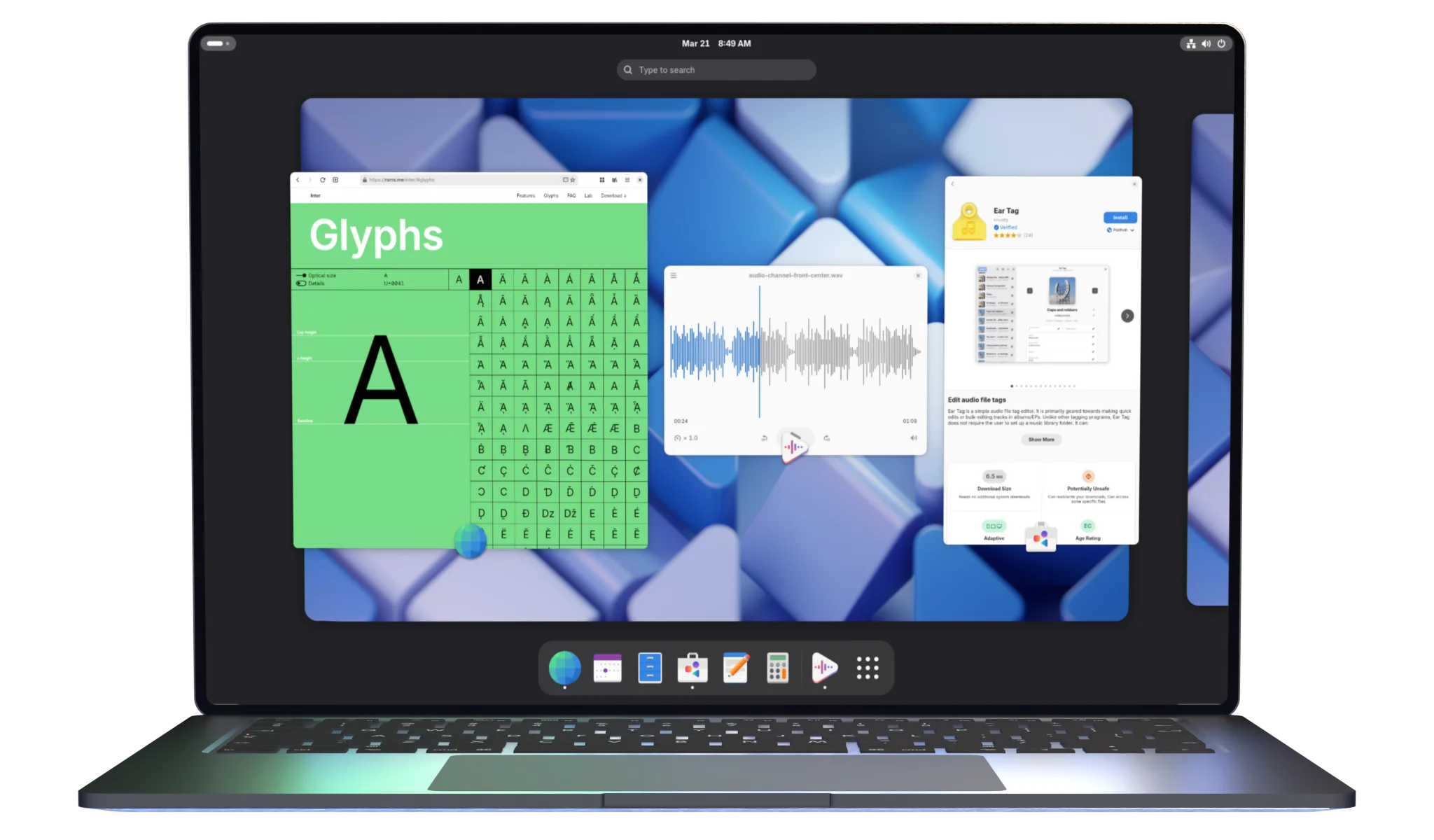 -## 使用 - -### 安装 +## 安装 - Debian: `sudo apt install gnome` - Fedora: `sudo dnf group install gnome-desktop` - Arch: `sudo pacman -S gnome` +## 使用 + ???+ note "找不到应用栏?" GNOME默认隐藏应用栏,将鼠标置于屏幕左上角即可换出。以下“扩展”部分会提供优化任务栏逻辑用的扩展。 diff --git a/docs/desktop/de/kde.md b/docs/desktop/de/kde.md index 05e93a6..23cc4a0 100644 --- a/docs/desktop/de/kde.md +++ b/docs/desktop/de/kde.md @@ -10,14 +10,14 @@ KDE Plasma 是兼具现代美感与极致灵活性的桌面环境。其界面采 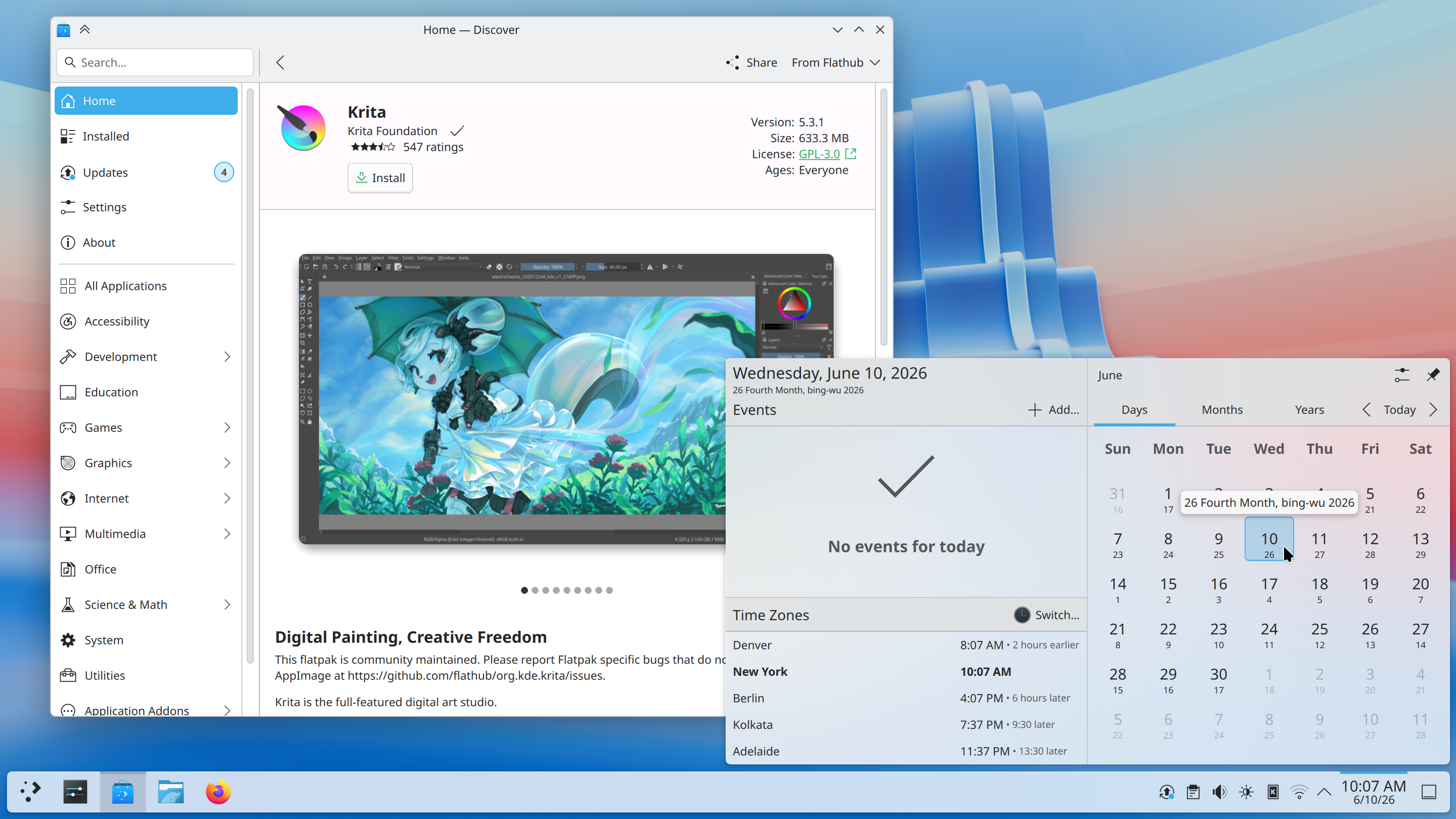 -## 使用 - -### 安装 +## 安装 - Debian: `sudo apt install plasma-desktop` - Fedora: `sudo dnf group install kde-desktop` - Arch: `sudo pacman -S plasma-desktop` +## 使用 + ### Kvantum Kvantum(包名为`kvantum`)是一个适用于KDE桌面环境的Qt主题引擎,用于自定义桌面外观和窗口样式。由于KDE的绝大多数预装应用都基于Qt,因此Kvantum十分适合于优化KDE的桌面外观,并能与KDE的丰富主题配合使用。 diff --git a/docs/desktop/desktop.md b/docs/desktop/desktop.md index f0a96a5..1c20369 100644 --- a/docs/desktop/desktop.md +++ b/docs/desktop/desktop.md @@ -1,5 +1,10 @@ -# 欢迎来到Desktop页面 +# 欢迎来到“桌面” -欢迎来到Desktop页面,我们在这里整理了主流的桌面环境,窗口管理器,dotfiles,旨在帮助您选择最适合你的图形化环境 +欢迎来到桌面页面,我们在这里整理了主流的桌面环境,窗口管理器,dotfiles,旨在帮助您选择最适合你的图形化环境。 -有关于[桌面环境](../concepts/linux/de.md)、[窗口管理器](../concepts/linux/wm.md)、[dotfiles](../concepts/linux/dotfiles.md),请跳转“概念”部分。
\ No newline at end of file +当前主流Linux桌面配置可以分为以下两类: + +- 传统桌面: 参考“桌面环境”一节 +- [平铺桌面](): 参考“窗口管理器”与“Dotfiles”(WIP) + +有关于[桌面环境](../concepts/desktop/de.md)、[窗口管理器](../concepts/desktop/wm.md)、[dotfiles](../concepts/desktop/dotfiles.md),请跳转“概念”部分。
\ No newline at end of file diff --git a/docs/desktop/wm/hyprland.md b/docs/desktop/wm/hyprland.md index 0580994..33f153c 100644 --- a/docs/desktop/wm/hyprland.md +++ b/docs/desktop/wm/hyprland.md @@ -1,13 +1,27 @@ # Hyprland +[官方Wiki(英文)](https://wiki.hypr.land/) + +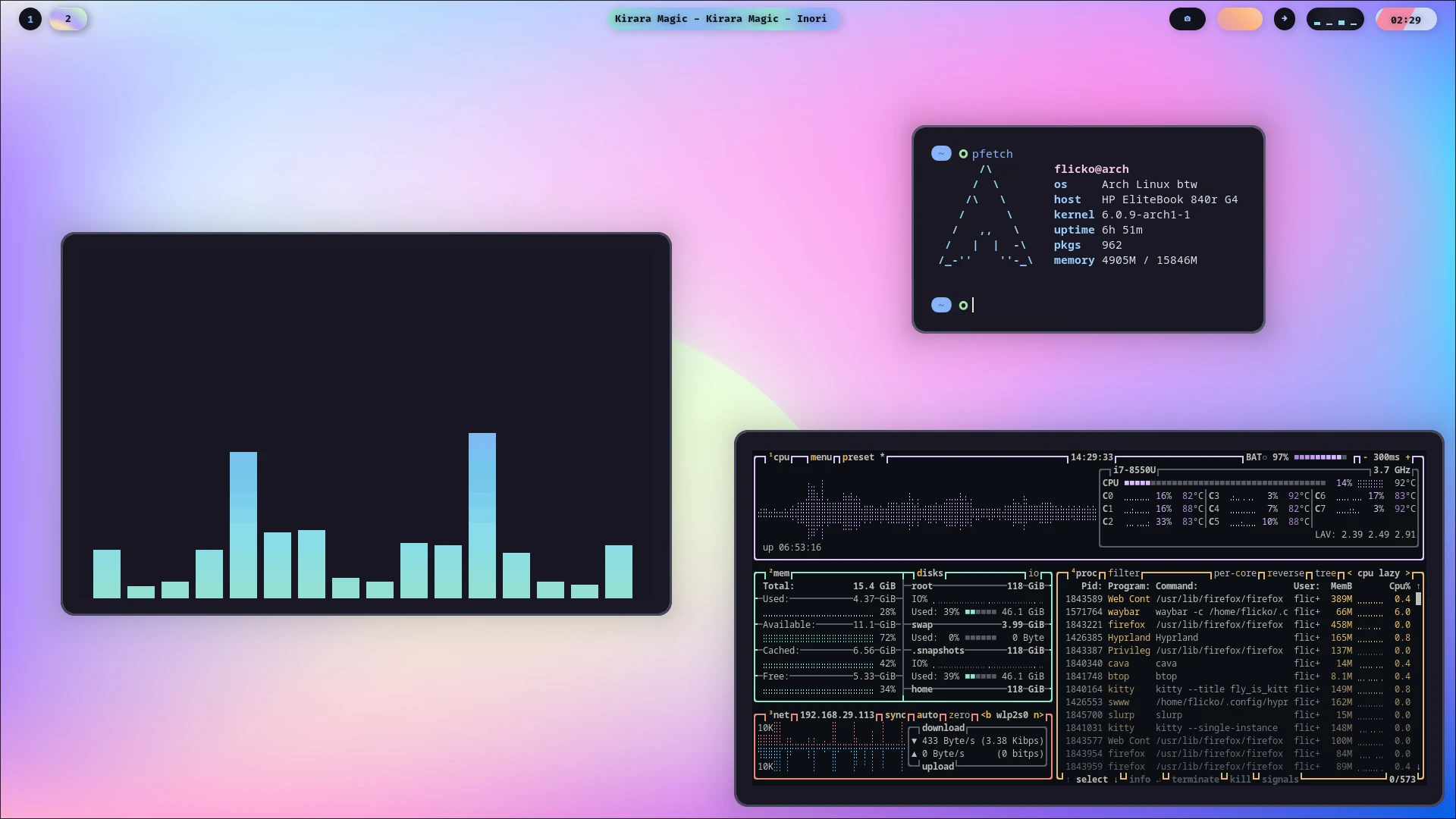 + +## 概述 + Hyprland 是一款在 Linux 社区,尤其是喜欢定制桌面环境的用户中非常热门的**动态平铺 Wayland 合成器**。它之所以特别,是因为它试图在强大的功能、炫酷的视觉效果和高度可定制性之间找到一个很好的平衡点。 -## 核心特性 +## 特性 -Hyprland拥有相对惊艳的视觉效果和,Hyprland支持动态平铺窗口,自动排列并充分利用屏幕空间。它支持多种平铺布局,如 dwindle(二分平铺)和 master(主从布局),并且可以为不同的工作区设置独立的布局,并通过自定义渲染器,能提供流畅的窗口动画、圆角等效果。 +Hyprland拥有相对惊艳的视觉效果,并支持动态平铺窗口,能够自动排列并充分利用屏幕空间。它支持多种平铺布局,如 dwindle(二分平铺)和 master(主从布局),并且可以为不同的工作区设置独立的布局,并通过自定义渲染器,能提供流畅的窗口动画、圆角等效果。 在美观的同时,Hyprland同时拥有极其强大的定制性,其修改的配置文件在保存时会自动重新热加载。且支持插件扩展,并提供了基于socket的IPC机制,方便其他程序与 Hyprland 交互,实现深度定制。 -!!!+waring "NVIDIA 注意事项" -由于NVIDIA对Wayland的实现问题,Hyprland官方对NVIDIA显卡的是不受支持的 (unsupported)。虽然有大量用户成功使用,但其配置过程中可能会遇到各种问题。如果你使用 NVIDIA 显卡,建议先阅读官方的 [NVIDIA 专页](https://wiki.hypr.land/Nvidia/)。 +!!! warning "NVIDIA 注意事项" +由于NVIDIA对Wayland的实现问题,Hyprland官方对NVIDIA显卡的是不受支持的 (unsupported)。虽然有大量用户成功使用,但其配置过程中可能会遇到各种问题。如果你使用 NVIDIA 显卡,建议先阅读官方的 [NVIDIA 专页(英文)](https://wiki.hypr.land/Nvidia/)。 + +## 安装 + +在安装之前,我们建议您首先选择好适合的[桌面外壳](../../concepts/desktop/desktop_shell.md)。 + +我们建议您参照[Hyprland的官方Wiki(英文)]进行安装。在安装Hyprland后,您需要一并安装好桌面外壳。 +???+ tip "DMS福利" + 如果您选择DMS作为桌面外壳,您可以直接通过其一键脚本连带安装Hyprland。详情见[桌面外壳](../../concepts/desktop/desktop_shell.md)。
\ No newline at end of file diff --git a/docs/desktop/wm/niri.md b/docs/desktop/wm/niri.md index 1a16736..2f97d80 100644 --- a/docs/desktop/wm/niri.md +++ b/docs/desktop/wm/niri.md @@ -1 +1,43 @@ # Niri + +[官方Wiki(英文,Github)](https://github.com/niri-wm/niri/wiki/) + +[翻译版Wiki](https://docs.akass.cn/niri/) + + + +## 概述 + +Niri是一个以滚动平铺为核心理念的Wayland合成器。它用Rust编写,将窗口在无限水平长条上按列布局,打开新窗口不会改变现有窗口大小,旨在提供流畅、有组织的工作体验,目前可稳定用于日常使用。 + +## 安装 + +在安装之前,我们建议您首先选择好适合的[桌面外壳](../../concepts/desktop/desktop_shell.md)。 + +具体安装步骤,请参考[Niri的快速入门](该指南中默认使用DMS作为桌面外壳,若您想要更换,请将其指令中的`dms`替换为其他选择)。 + +???+ tip "DMS福利" + 如果您选择DMS作为桌面外壳,您也可以直接通过其一键脚本连带安装Niri。详情见[桌面外壳](../../concepts/desktop/desktop_shell.md)。 + +在安装Niri之后会出现一系列快捷键,我们建议您截图或拍照保存。由于Niri管理的窗口不适于直接使用鼠标拖动,因而您需要记忆一些关键快捷键来管理布局(当然,如果您有触控板,通过多指手势操作,不会部分快捷键也无妨)。 + +## 使用 + +### 屏幕共享 + +在Niri下,部分应用的屏幕共享功能可能失效。解决方法参照下方。 + +1. 安装`xdg-desktop-portal-hyprland` +2. 修改`/usr/share/xdg-desktop-portal/niri-portals.conf` + +``` +[preferred] +default=hyprland;gtk; +org.freedesktop.impl.portal.Access=gtk; +org.freedesktop.impl.portal.Notification=gtk; +org.freedesktop.impl.portal.Secret=gnome-keyring; +``` + +(来自[使用niri,飞书无法共享屏幕](https://forum.archlinuxcn.org/t/topic/15155)) + +或者,您也可以试试[解决 Linux niri-wm 上腾讯会议的屏幕共享问题](https://forum.nju-aia.com/t/topic/196)。
\ No newline at end of file diff --git a/docs/distros/arch/archlinux.md b/docs/distros/arch/archlinux.md index c83448c..befbb60 100644 --- a/docs/distros/arch/archlinux.md +++ b/docs/distros/arch/archlinux.md @@ -17,7 +17,7 @@ Arch Linux 是 Linux 社区中最受欢迎的独立滚动更新(Rolling Releas - TUNA: https://mirrors.tuna.tsinghua.edu.cn/archlinux/iso/ - USTC: https://mirrors.ustc.edu.cn/archlinux/iso/ - MirrorZ: https://mirrors.cernet.edu.cn/archlinux/iso/ - - 包管理器:pacman + - 包管理器:[pacman](../../concepts/package_managers/pacman.md) !!! warning "警告" Arch 严禁“部分升级”(Partial Upgrade)。请勿在未同步升级全系统的情况下单独安装或更新某个软件,否则极易导致系统依赖断裂造成所谓的 **“滚挂”** !此外,推荐配置 **AUR (Arch User Repository)** 并配合 yay 或 paru 等助手使用,可以提升使用体验。 - 更新方式:滚动 diff --git a/docs/distros/arch/artixlinux.md b/docs/distros/arch/artixlinux.md index 715c522..75af53e 100644 --- a/docs/distros/arch/artixlinux.md +++ b/docs/distros/arch/artixlinux.md @@ -16,7 +16,7 @@ Artix Linux 是一个基于 Arch Linux 的独立硬核发行版。它最大的ç‰ - TUNA: https://mirrors.tuna.tsinghua.edu.cn/artixlinux-iso/ - USTC: 无 - MirrorZ: 无 - - 包管理器:pacman + - 包管理器:[pacman](../../concepts/package_managers/pacman.md) - 更新方式:滚动 - 自动换源:是 - 图形安装界面:是 diff --git a/docs/distros/arch/cachy.md b/docs/distros/arch/cachy.md index 3de151a..4dec29c 100644 --- a/docs/distros/arch/cachy.md +++ b/docs/distros/arch/cachy.md @@ -18,7 +18,7 @@ CachyOS 是一个基于 Arch Linux 优化的高性能滚动更新发行版。它 - TUNA: 无 - USTC: https://mirrors.ustc.edu.cn/cachyos/ISO/ - MirrorZ: https://mirrors.cernet.edu.cn/cachyos/ISO/ - - 包管理器:pacman + - 包管理器:[pacman](../../concepts/package_managers/pacman.md) - 更新方式:滚动 - 自动换源:是 - 图形安装界面:是 diff --git a/docs/distros/arch/endeavouros.md b/docs/distros/arch/endeavoros.md index e69de29..e69de29 100644 --- a/docs/distros/arch/endeavouros.md +++ b/docs/distros/arch/endeavoros.md diff --git a/docs/distros/debian/debian.md b/docs/distros/debian/debian.md index c10fa34..e8b5e85 100644 --- a/docs/distros/debian/debian.md +++ b/docs/distros/debian/debian.md @@ -12,12 +12,12 @@ Debian是一个由全球志愿者社区维护的自由开源操作系统。它ä» - 发行者:Debian计划 - 官网:https://www.debian.org/ - 支持的系统架构:x86_64 - - 自由软件:是/否 + - 自由软件:是(部分自由) - 镜像下载地址: - TUNA: https://mirrors.tuna.tsinghua.edu.cn/debian-cd/ - USTC: https://mirrors.ustc.edu.cn/debian-cd/ - MirrorZ: https://mirrors.cernet.edu.cn/debian-cd/ - - 包管理器:apt + - 包管理器:[apt](../../concepts/package_managers/apt.md) - 更新方式:版本/滚动 - 自动换源:302 - 图形安装界面:是 diff --git a/docs/distros/debian/deepin.md b/docs/distros/debian/deepin.md index 467ca1a..b5af9b5 100644 --- a/docs/distros/debian/deepin.md +++ b/docs/distros/debian/deepin.md @@ -20,7 +20,7 @@ Deepin(深度操作系统)是一款源自中国、享誉全球的Linux发行 - TUNA: https://mirrors.tuna.tsinghua.edu.cn/deepin-cd/ - USTC: https://mirrors.ustc.edu.cn/deepin-cd/ - MirrorZ: https://mirrors.cernet.edu.cn/deepin-cd/ - - 包管理器:apt + - 包管理器:[apt](../../concepts/package_managers/apt.md) - 更新方式:OSTree - 自动换源:半自动 - 图形安装界面:是 diff --git a/docs/distros/debian/linuxmint.md b/docs/distros/debian/linuxmint.md index 9a99920..f0addb9 100644 --- a/docs/distros/debian/linuxmint.md +++ b/docs/distros/debian/linuxmint.md @@ -17,7 +17,7 @@ Linux Mint 是公认对 Windows 迁移用户最友好的 Linux 发行版。它ä¸ - TUNA: https://mirrors.tuna.tsinghua.edu.cn/linuxmint-cd/ - USTC: https://mirrors.ustc.edu.cn/linuxmint-cd/ - MirrorZ: https://mirrors.cernet.edu.cn/linuxmint-cd/ - - 包管理器:apt + - 包管理器:[apt](../../concepts/package_managers/apt.md) - 更新方式:版本 - 自动换源:半自动 - 图形安装界面:是 diff --git a/docs/distros/debian/ubuntu.md b/docs/distros/debian/ubuntu.md index 31bbd3e..0d8748f 100644 --- a/docs/distros/debian/ubuntu.md +++ b/docs/distros/debian/ubuntu.md @@ -17,7 +17,7 @@ Ubuntu是当今最受认可的Linux发行版,也是中国国家操作系统基 - TUNA: https://mirrors.tuna.tsinghua.edu.cn/ubuntu-cdimage/ - USTC: https://mirrors.ustc.edu.cn/ubuntu-cdimage/ - MirrorZ: https://mirrors.cernet.edu.cn/ubuntu-cdimage/ - - 包管理器:apt + - 包管理器:[apt](../../concepts/package_managers/apt.md) !!! warning "警告" 注意!使用apt安装部分软件时可能[被Snap劫持](https://www.zhihu.com/question/47659130)! - 更新方式:版本 diff --git a/docs/distros/rhel/almalinux.md b/docs/distros/rhel/almalinux.md index c27265d..5753496 100644 --- a/docs/distros/rhel/almalinux.md +++ b/docs/distros/rhel/almalinux.md @@ -17,7 +17,7 @@ ALmaLinux与Rocky Linux一样,是RHEL的开源衍生版本。作为企业级 L - TUNA: 无 - USTC: 无 - MirrorZ: https://mirrors.cernet.edu.cn/almalinux/ - - 包管理器:dnf + - 包管理器:[dnf](../../concepts/package_managers/dnf.md) - 更新方式:传统 - 自动换源:302 - 图形安装界面:是 diff --git a/docs/distros/rhel/fedora.md b/docs/distros/rhel/fedora.md index 5d9304d..5e41d39 100644 --- a/docs/distros/rhel/fedora.md +++ b/docs/distros/rhel/fedora.md @@ -17,7 +17,7 @@ Fedora是一款前沿、开放的发行版,有着广泛的社区支持,并ä¸ - TUNA: https://mirrors.tuna.tsinghua.edu.cn/fedora/releases/ - USTC: https://mirrors.ustc.edu.cn/fedora/releases/ - MirrorZ: https://mirrors.cernet.edu.cn/fedora/releases/ - - 包管理器:dnf + - 包管理器:[dnf](../../concepts/package_managers/dnf.md) - 更新方式:传统/OSTree - 自动换源:302 - 图形安装界面:是 diff --git a/docs/distros/rhel/rhel.md b/docs/distros/rhel/rhel.md index f913e3f..88259e4 100644 --- a/docs/distros/rhel/rhel.md +++ b/docs/distros/rhel/rhel.md @@ -12,12 +12,12 @@ - 发行者:Red Hat - 官网:https://www.redhat.com/zh-cn - 支持的系统架构:x86_64/arm64/ppc64le/s390x - - 自由软件:是(部分自由) + - 自由软件:是(**有条件自由**) - 镜像下载地址: - TUNA: 无 - USTC: 无 - MirrorZ: 无 - - 包管理器:dnf + - 包管理器:[dnf](../../concepts/package_managers/dnf.md) - 更新方式:传统 - 自动换源:否 - 图形安装界面:是 diff --git a/docs/distros/rhel/rocky.md b/docs/distros/rhel/rocky.md index b09d05d..34212f5 100644 --- a/docs/distros/rhel/rocky.md +++ b/docs/distros/rhel/rocky.md @@ -17,7 +17,7 @@ Rocky Linux是RHEL的下游版本。在RedHat宣布停止公开RHEL源代码后ï - TUNA: 无 - USTC: https://mirrors.ustc.edu.cn/rocky/ - MirrorZ: https://mirrors.cernet.edu.cn/rocky/ - - 包管理器:dnf + - 包管理器:[dnf](../../concepts/package_managers/dnf.md) - 更新方式:传统 - 自动换源:302 - 图形安装界面:是 diff --git a/docs/getting-started/before-installing.md b/docs/getting-started/before-installing.md index 90f1224..9f78339 100644 --- a/docs/getting-started/before-installing.md +++ b/docs/getting-started/before-installing.md @@ -4,9 +4,9 @@ 在开始之前,您需要准备好一个空U盘(建议8GB以上),并且(最好)关闭电脑的安全启动 (Secure Boot) 功能。 -如果您使用Windows,可以参考这篇较为简单的[教程](https://zhuanlan.zhihu.com/p/719651215)进入BIOS。 +如果您使用Windows,可以参考这篇较为简单的[教程](https://zhuanlan.zhihu.com/p/719651215)进入[BIOS](../concepts/operating_system/bios.md)。 -进入BIOS后,请通过方向键进入Security->Secure Boot,并将其设置为Disabled状态。 +进入[BIOS](../concepts/operating_system/bios.md)后,请通过方向键进入Security->Secure Boot,并将其设置为Disabled状态。 各品牌、型号电脑关闭安全启动的方法不同,如果与提供的路径不同,我们建议您使用AI辅助或搜索具体解决方案。 @@ -15,7 +15,7 @@ ## 选择发行版 -发行版选择至关重要,这会从根本上决定您的日常使用体验。我们建议您参考网络资料与用户评价进行选择,或者被其他人“带师”。 +[发行版](../concepts/linux/distro.md)选择至关重要,这会从根本上决定您的日常使用体验。我们建议您参考网络资料与用户评价进行选择,或者被其他人“带师”。 !!! warning "警告" 如果您初入Linux,我们建议您选择Debian系或红帽系发行版试水。**我们不建议任何新手用户直接使用Arch Linux!!!** @@ -79,15 +79,15 @@ 在继续之前,我们建议您阅读并**分辨**以下概念章节: - - 发行版 - - 桌面环境 - - 窗口管理器 - - 平铺/滚动式桌面 + - [发行版](../concepts/linux/distro.md) + - [桌面环境](../concepts/desktop/de.md) + - [窗口管理器](../concepts/desktop/wm.md) + - [平铺式桌面](../concepts/desktop/tiling_desktop.md) ## 调配分区 -我们建议您通过专业的分区工具(如[DiskGenius](https://www.diskgenius.cn/)和Windows的磁盘管理单元)进行分区。您需要用分区工具在电脑硬盘上腾出60GB以上(建议值)的**空闲**空间。我们不建议直接在DiskGenius等WIndows下软件创建分区,而是在安装时由安装程序进行创建,这可以保证系统的稳定性和分区一致性。 +我们建议您通过专业的[分区](../concepts/operating_system/partition.md)工具(如[DiskGenius](https://www.diskgenius.cn/)和Windows的磁盘管理单元)进行分区。您需要用分区工具在电脑硬盘上腾出60GB以上(建议值)的**空闲**空间。我们不建议直接在DiskGenius等WIndows下软件创建分区,而是在安装时由安装程序进行创建,这可以保证系统的稳定性和分区一致性。 我们建议您在操作完分区后用其他设备记录您磁盘的分区图示/顺序,这在安装系统时非常有用。 @@ -117,9 +117,9 @@  - COSMIC: 拥有优秀的窗口管理机制,自定义性强,是下一代的前卫Wayland桌面环境  - - Hyprland: 平铺窗口管理器,具有炫酷的视觉效果,并拥有Wayland的最新特性,不过配置复杂,并且只建议在Arch Linux上获得最佳体验 + - [Hyprland](../desktop/wm/hyprland.md): 平铺窗口管理器,具有炫酷的视觉效果,并拥有Wayland的最新特性,不过配置复杂,并且只建议在Arch Linux上获得最佳体验  - - Niri: 滚动窗口管理器,比Hyprland更适合生产环境与触控板逻辑,同样配置复杂,但发行版覆盖范围广 + - [Niri](../desktop/wm/niri.md): 平铺窗口管理器,比Hyprland更适合生产环境与触控板逻辑,同样配置复杂,但发行版覆盖范围广  ## 烧录镜像 diff --git a/docs/getting-started/common-command.md b/docs/getting-started/common-command.md index 780740c..0c36567 100644 --- a/docs/getting-started/common-command.md +++ b/docs/getting-started/common-command.md @@ -89,4 +89,15 @@ --- -chmod, chown等(WIP)
\ No newline at end of file +chmod, chown等(WIP) + +## 系统维护工具 + +### nano + +nano(包名`nano`)是广受赞誉的终端文本编辑器,拥有简单易操作的界面,适合新手用来通过终端编辑系统配置文件。 + +例如:`sudo nano /etc/sudoers`指以超级管理员权限,用nano修改`/etc/sudoers`。 + +???+ note "权限" + 编辑部分配置文件时需要`sudo`提权。
\ No newline at end of file diff --git a/docs/getting-started/post-installation.md b/docs/getting-started/post-installation.md index 9e9d23c..b0ed0f9 100644 --- a/docs/getting-started/post-installation.md +++ b/docs/getting-started/post-installation.md @@ -21,7 +21,7 @@ ## Flatpak -Flatpak是新一代Linux软件管理工具。其采用沙箱式设计,使得软件能够兼容多数发行版。并且,基于Flatpak的Flathub是Linux上极其重要的应用商店,深度集成于KDE Discover, GNOME。 +[Flatpak](../concepts/package_managers/flatpak.md)是新一代Linux软件管理工具。其采用沙箱式设计,使得软件能够兼容多数发行版。并且,基于Flatpak的Flathub是Linux上极其重要的应用商店,深度集成于KDE Discover, GNOME。 **对于用户软件,我们推荐您使用Flatpak进行安装。** @@ -64,7 +64,7 @@ Flatpak是新一代Linux软件管理工具。其采用沙箱式设计,使得è½ ### Win -> Linux -若您的Linux使用ext文件系统,则Windows会由于不支持ext而无法访问Linux的文件。 +若您的Linux使用ext[文件系统](../concepts/operating_system/file_system.md),则Windows会由于不支持ext而无法访问Linux的文件。 您只需在Windows下载安装[Ext4Fsd](https://www.accum.se/~bosse/ext2fsd/0.71/Ext2Fsd-0.71-setup.exe)即可解决。 diff --git a/docs/getting-started/purpose.md b/docs/getting-started/purpose.md index ea94fb0..86d5a8c 100644 --- a/docs/getting-started/purpose.md +++ b/docs/getting-started/purpose.md @@ -27,7 +27,7 @@ 2. 我能否忍受可能会带来的不便与学习成本? 这包括可能会和终端打一部分交道,以及可能存在的不稳定性风险。 3. 我能否完全脱离Windows? - 如果不能,您需要参考“虚拟机”、“兼容层”等章节(WIP)。 + 如果不能,您需要参考“虚拟机”、[Wine](../compatibility/windows/wine.md)等章节(WIP)。 检查完毕!打开下一章,开始我们的旅途吧! @@ -41,7 +41,7 @@ ### 3. 我向往自由(软件) -欢迎来到自由世界!Linux自创立之初就是自由软件(准确来说是创立之后不久),并且极大地推动了世界自由软件的发展,是兼顾“支持”与“自由”的选择。 +欢迎来到自由世界!Linux自创立之初就是[自由软件](../concepts/linux/free_software.md)(准确来说是创立之后不久),并且极大地推动了世界自由软件的发展,是兼顾“支持”与“自由”的选择。 我们的教程在编写的时候也会给各个发行版以及相应的软件包标上是否自由的标签,您可以放心阅读。 @@ -59,9 +59,9 @@ 并且,您一定要明辨下面的几个概念: - - 桌面环境 (DE) - - 发行版 - - 窗口管理器 (WM) + - [桌面环境 (DE)](../concepts/desktop/de.md) + - [发行版](../concepts/linux/distro.md) + - [窗口管理器 (WM)](../concepts/desktop/wm.md) - 更新模式 好啦,既然你已经准备好了,那我们就向下继续吧! diff --git a/docs/img/CoW.png b/docs/img/CoW.png Binary files differnew file mode 100644 index 0000000..44c7a66 --- /dev/null +++ b/docs/img/CoW.png diff --git a/docs/img/untiling.png b/docs/img/untiling.png Binary files differnew file mode 100644 index 0000000..6b1ff4f --- /dev/null +++ b/docs/img/untiling.png |

