
diff options
Diffstat (limited to '')
| -rw-r--r-- | docs/desktop/de/gnome.md | 8 | ||||
| -rw-r--r-- | docs/desktop/de/kde.md | 48 | ||||
| -rw-r--r-- | docs/desktop/de/xfce.md | 10 | ||||
| -rw-r--r-- | docs/desktop/desktop.md | 2 | ||||
| -rw-r--r-- | docs/desktop/wm/hyprland.md | 4 | ||||
| -rw-r--r-- | docs/desktop/wm/i3.md | 6 | ||||
| -rw-r--r-- | docs/desktop/wm/niri.md | 2 | ||||
| -rw-r--r-- | docs/desktop/wm/sway.md | 22 |
8 files changed, 51 insertions, 51 deletions
diff --git a/docs/desktop/de/gnome.md b/docs/desktop/de/gnome.md index cbea838..f806d65 100644 --- a/docs/desktop/de/gnome.md +++ b/docs/desktop/de/gnome.md @@ -65,12 +65,12 @@ GNOME的主题通常需要在 [GNOME-LOOK.ORG](https://www.gnome-look.org/) 中ä 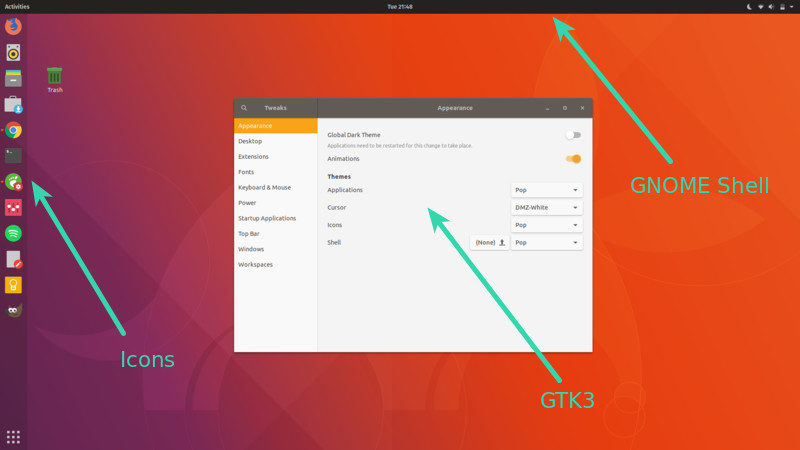 -(来自[How to Install and Change GNOME Theme in Linux](https://itsfoss.com/install-switch-themes-gnome-shell/)) +(来自[How to Install and Change GNOME Theme in Linux](https://itsfoss.com/install-switch-themes-gnome-shell/)) -在下载好主题后,您需要将压缩包解压到文件夹并置于以下任意一个文件夹中(按需求选择,用户安装指仅为本用户安装,系统安装则为所有用户安装): +在下载好主题后,您需要将压缩包解压到文件夹并置于以下任意一个文件夹中(按需求选择,用户安装指仅为本用户安装,系统安装则为所有用户安装): -- 用户安装: `~/.themes/` -- 系统安装: `/usr/share/themes/`(可能需要自行创建) +- 用户安装:`~/.themes/` +- 系统安装:`/usr/share/themes/`(可能需要自行创建) 您可以通过前文安装的`gnome-tweaks`启用主题,也可以按照对应主题下的启用指南来启用。 diff --git a/docs/desktop/de/kde.md b/docs/desktop/de/kde.md index fbfb593..d7e4c14 100644 --- a/docs/desktop/de/kde.md +++ b/docs/desktop/de/kde.md @@ -44,35 +44,35 @@ Kvantum(包名为`kvantum`)是一个适用于KDE桌面环境的Qt主题引æ“ ##### 用户安装 - - 全局主题 (Global Theme):`~/.local/share/plasma/look-and-feel/` - - Plasma 外观样式 (Plasma Style):`~/.local/share/plasma/desktoptheme/` - - 颜色 (Color Scheme):`~/.local/share/color-schemes/` - - 图标 (Icon Theme):`~/.local/share/icons/` - - 面板预设模板 (Panel Layout Template):`~/.local/share/plasma/layout-templates/` - - 任务切换器 (Task Switcher):`~/.local/share/kwin/tabbox/` - - 小部件 (Plasma Widget):`~/.local/share/plasma/plasmoids/` - - 壁纸插件 (Wallpaper Plugin):`~/.local/share/plasma/wallpapers/` - - 窗口装饰 (Window Decoration):`~/.local/share/aurorae/themes/` + - 全局主题(Global Theme):`~/.local/share/plasma/look-and-feel/` + - Plasma 外观样式(Plasma Style):`~/.local/share/plasma/desktoptheme/` + - 颜色(Color Scheme):`~/.local/share/color-schemes/` + - 图标(Icon Theme):`~/.local/share/icons/` + - 面板预设模板(Panel Layout Template):`~/.local/share/plasma/layout-templates/` + - 任务切换器(Task Switcher):`~/.local/share/kwin/tabbox/` + - 小部件(Plasma Widget):`~/.local/share/plasma/plasmoids/` + - 壁纸插件(Wallpaper Plugin):`~/.local/share/plasma/wallpapers/` + - 窗口装饰(Window Decoration):`~/.local/share/aurorae/themes/` - 桌面特效(KWin 效果)(KWin Effect):`~/.local/share/kwin/effects/` - - KWin 脚本 (KWin Script):`~/.local/share/kwin/scripts/` - - 登录屏幕 (SDDM) (Login Screen):无用户安装路径 - - 欢迎屏幕 (Splash Screen):`~/.local/share/plasma/look-and-feel/<主题名称>/contents/splash/` + - KWin 脚本(KWin Script):`~/.local/share/kwin/scripts/` + - 登录屏幕(SDDM)(Login Screen):无用户安装路径 + - 欢迎屏幕(Splash Screen):`~/.local/share/plasma/look-and-feel/<主题名称>/contents/splash/` ##### 系统安装 - - 全局主题 (Global Theme):`/usr/share/plasma/look-and-feel/` - - Plasma 外观样式 (Plasma Style):`/usr/share/plasma/desktoptheme/` - - 颜色 (Color Scheme):`/usr/share/color-schemes/` - - 图标 (Icon Theme):`/usr/share/icons/` - - 面板预设模板 (Panel Layout Template):`/usr/share/plasma/layout-templates/` - - 任务切换器 (Task Switcher):`/usr/share/kwin/tabbox/` - - 小部件 (Plasma Widget):`/usr/share/plasma/plasmoids/` - - 壁纸插件 (Wallpaper Plugin):`/usr/share/plasma/wallpapers/` - - 窗口装饰 (Window Decoration):`/usr/share/aurorae/themes/` + - 全局主题(Global Theme):`/usr/share/plasma/look-and-feel/` + - Plasma 外观样式(Plasma Style):`/usr/share/plasma/desktoptheme/` + - 颜色(Color Scheme):`/usr/share/color-schemes/` + - 图标(Icon Theme):`/usr/share/icons/` + - 面板预设模板(Panel Layout Template):`/usr/share/plasma/layout-templates/` + - 任务切换器(Task Switcher):`/usr/share/kwin/tabbox/` + - 小部件(Plasma Widget):`/usr/share/plasma/plasmoids/` + - 壁纸插件(Wallpaper Plugin):`/usr/share/plasma/wallpapers/` + - 窗口装饰(Window Decoration):`/usr/share/aurorae/themes/` - 桌面特效(KWin 效果)(KWin Effect):`/usr/share/kwin/effects/` - - KWin 脚本 (KWin Script):`/usr/share/kwin/scripts/ (` - - 登录屏幕 (SDDM) (Login Screen):`/usr/share/plasma/lookandfeel/<全局主题名称>/contents/splash/` - - 欢迎屏幕 (Splash Screen):`~/.local/share/plasma/look-and-feel/<全局主题名称>/contents/splash/` + - KWin 脚本(KWin Script):`/usr/share/kwin/scripts/ (` + - 登录屏幕(SDDM)(Login Screen):`/usr/share/plasma/lookandfeel/<全局主题名称>/contents/splash/` + - 欢迎屏幕(Splash Screen):`~/.local/share/plasma/look-and-feel/<全局主题名称>/contents/splash/` (以上内容来自于[Plasma themes and plugins](https://develop.kde.org/docs/plasma/)) diff --git a/docs/desktop/de/xfce.md b/docs/desktop/de/xfce.md index 8eab074..ea037f7 100644 --- a/docs/desktop/de/xfce.md +++ b/docs/desktop/de/xfce.md @@ -8,14 +8,14 @@ ## 概述 -Xfce是一个轻量级的[桌面环境](../desktop.md#_2),Xfce有着快速、轻便且易于使用的优点,Xfce开机占用的内存大约只有700M,Xfce一开始使用X11显示协议,自从4.20版本开始提供了实验性的Wayland支持。 +Xfce是一个轻量级的[桌面环境](../desktop.md#_2),Xfce有着快速、轻便且易于使用的优点,Xfce开机占用的内存大约只有700M,Xfce一开始使用X11显示协议,自从4.20版本开始提供了实验性的Wayland支持。 ## 安装 -- Debian系列: `sudo apt install xfce4` -- 红帽系: `sudo dnf install xfce4` -- Arch系: `sudo pacman -S xfce4` +- Debian系列:`sudo apt install xfce4` +- 红帽系:`sudo dnf install xfce4` +- Arch系:`sudo pacman -S xfce4` ## 配置 -您可以在开始菜单里打开设置管理器配置字体图标,您可以在桌面空白处右键选择桌面设置配置壁纸,Xfce的大多数设置都可以使用图形化的设置界面里完成修改。 +您可以在开始菜单里打开设置管理器配置字体图标,您可以在桌面空白处右键选择桌面设置配置壁纸,Xfce的大多数设置都可以使用图形化的设置界面里完成修改。 diff --git a/docs/desktop/desktop.md b/docs/desktop/desktop.md index 28e103a..d56d132 100644 --- a/docs/desktop/desktop.md +++ b/docs/desktop/desktop.md @@ -34,7 +34,7 @@ ### 桌面外壳 -英文: Desktop Shell +英文:Desktop Shell 狭义来看,桌面外壳是指在**平铺窗口管理器**中,提供用户界面的应用套件(例如GNOME预装应用等)。 diff --git a/docs/desktop/wm/hyprland.md b/docs/desktop/wm/hyprland.md index dce537d..fc4373a 100644 --- a/docs/desktop/wm/hyprland.md +++ b/docs/desktop/wm/hyprland.md @@ -5,7 +5,7 @@ [官方Wiki(英文)](https://wiki.hypr.land/) -配置文件: `~/.config/hypr/hyprland.lua` +配置文件:`~/.config/hypr/hyprland.lua` ## 概述 @@ -20,7 +20,7 @@ Hyprland拥有相对惊艳的视觉效果,并支持动态平铺窗口,能够 在美观的同时,Hyprland同时拥有极其强大的定制性,其修改的配置文件在保存时会自动重新热加载。且支持插件扩展,并提供了基于socket的IPC机制,方便其他程序与 Hyprland 交互,实现深度定制。 !!! warning "NVIDIA 注意事项" - 由于NVIDIA对Wayland的实现问题,Hyprland官方对NVIDIA显卡的是不受支持的 (unsupported)。虽然有大量用户成功使用,但其配置过程中可能会遇到各种问题。如果你使用 NVIDIA 显卡,建议先阅读官方的 [NVIDIA 专页(英文)](https://wiki.hypr.land/Nvidia/)。 + 由于NVIDIA对Wayland的实现问题,Hyprland官方对NVIDIA显卡的是不受支持的(unsupported)。虽然有大量用户成功使用,但其配置过程中可能会遇到各种问题。如果你使用 NVIDIA 显卡,建议先阅读官方的 [NVIDIA 专页(英文)](https://wiki.hypr.land/Nvidia/)。 ## 安装 diff --git a/docs/desktop/wm/i3.md b/docs/desktop/wm/i3.md index 521a1ff..bb37bc6 100644 --- a/docs/desktop/wm/i3.md +++ b/docs/desktop/wm/i3.md @@ -14,11 +14,11 @@ i3是一个平铺窗口管理器,采用BSD许可证发布,采用X11显示协 ## 安装 -- Debian系: `sudo apt install i3-wm` +- Debian系:`sudo apt install i3-wm` - 红帽系:`sudo dnf install i3-wm` -- Arch系: `sudo pacman -S i3-wm` +- Arch系:`sudo pacman -S i3-wm` -## 使用(默认快捷键) +## 使用(默认快捷键) 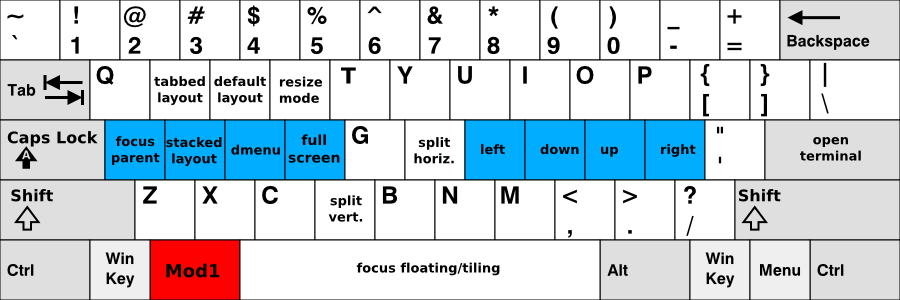 diff --git a/docs/desktop/wm/niri.md b/docs/desktop/wm/niri.md index 2ed4ba0..b569657 100644 --- a/docs/desktop/wm/niri.md +++ b/docs/desktop/wm/niri.md @@ -4,7 +4,7 @@ [官方Wiki(英文,Github)](https://github.com/niri-wm/niri/wiki/) [翻译版Wiki](https://docs.akass.cn/niri/) -配置文件: `~/.config/niri/config.kdl` +配置文件:`~/.config/niri/config.kdl` ## 概述 diff --git a/docs/desktop/wm/sway.md b/docs/desktop/wm/sway.md index 61112d4..c961051 100644 --- a/docs/desktop/wm/sway.md +++ b/docs/desktop/wm/sway.md @@ -1,6 +1,6 @@ # Sway -**Sway的配置文件在`/etc/sway`下,其名称为`config`,应复制到`~/.config/sway`下**。 +**Sway的配置文件在`/etc/sway`下,其名称为`config`,应复制到`~/.config/sway`下**。  @@ -10,25 +10,25 @@ [官方文档](https://github.com/swaywm/sway/wiki) -**注意:如果您使用NVIDIA的闭源驱动,您无法使用Sway,Sway也不会添加关于NVIDIA的支持** +**注意:如果您使用NVIDIA的闭源驱动,您无法使用Sway,Sway也不会添加关于NVIDIA的支持** ## 概述 -Sway是一个平铺窗口管理器,采用Wayland显示协议,采用[MIT许可证](https://github.com/swaywm/sway?tab=MIT-1-ov-file)发布,常被认为是i3的Wayland版本,[i3](https://hb.linuxcabin.top/desktop/wm/i3/)的配置文件几乎可以直接替代,具体可看官方文档, +Sway是一个平铺窗口管理器,采用Wayland显示协议,采用[MIT许可证](https://github.com/swaywm/sway?tab=MIT-1-ov-file)发布,常被认为是i3的Wayland版本,[i3](https://hb.linuxcabin.top/desktop/wm/i3/)的配置文件几乎可以直接替代,具体可看官方文档。 ## 安装 -- Debian系: `sudo apt install sway` -- 红帽系: `sudo dnf install sway` -- Arch系: `sudo pacman -S sway` +- Debian系:`sudo apt install sway` +- 红帽系:`sudo dnf install sway` +- Arch系:`sudo pacman -S sway` -## 使用(快捷键) +## 使用(快捷键) -**Sway的Mod键为Super键(即Win键,Alt左边的键),如果您不喜欢,您可以将配置文件开头的Mod4改为Mod1,可使Mod键变为Alt键** +**Sway的Mod键为Super键(即Win键,Alt左边的键),如果您不喜欢,您可以将配置文件开头的Mod4改为Mod1,可使Mod键变为Alt键** -- Mod+Return 打开终端(默认终端为Foot) +- Mod+Return 打开终端(默认终端为Foot) - Mod+Shift+q 关闭窗口 -- Mod+d 打开一个启动器(默认为wmenu) +- Mod+d 打开一个启动器(默认为wmenu) - Mod+Shift+c 重新加载配置文件 - Mod+h/j/k/l 控制聚焦窗口 - Mod+f 全屏窗口 @@ -42,7 +42,7 @@ Sway是一个平铺窗口管理器,采用Wayland显示协议,采用[MIT许可证 `bindsym $mod+一个键 exec 软件名称` -您可以使用以下语法配置壁纸(前提您安装了Swaybg,feh等在X11下常用的壁纸软件在Wayland无法使用) +您可以使用以下语法配置壁纸(前提您安装了Swaybg、feh等在X11下常用的壁纸软件在Wayland无法使用) `output 显示器名称 bg 壁纸存放地址 stretch` |